The search for a reliable text to video creator grows every year. Creators want speed, accuracy, and tools that support real workflows. In 2026, the field is competitive, but a few platforms stand out. This article looks at what makes a strong text to video tool in 2026 and why Pictory AI Studio ranks near the top. It also explains how AI Studio supports creators with an integrated text to image generator and text based video production process.
What Makes a Text to Video Creator Effective in 2026
A strong text to video system in 2026 must support a clear workflow. The tool should help people write scripts, produce scenes, add voiceovers, create visuals, and export results without friction. The platform should also reduce manual editing.
Key capabilities include:
- Script to scene matching
- Accurate scene detection
- Clear timeline control
- Integrated AI image generation
- Stock assets
- Voice generation
- Fast rendering
- Flexible aspect ratios
Platforms that offer these features help creators finish projects with fewer steps.
Why Interest in Text to Video Tools Continues to Grow
Creators want more video output for social platforms, ads, blogs, and training content. Teams also want to reuse written material. Text to video systems solve this by turning scripts, articles, and prompts into ready projects. This approach saves time for both individuals and teams.
Pictory AI Studio as a Leading Text to Video Creator for 2026
Pictory continues to improve its video production suite. In 2026, Pictory AI Studio includes more capabilities inside one editor. This reduces switching between tools and creates a smoother workflow.
Core Features That Support Text to Video Creation
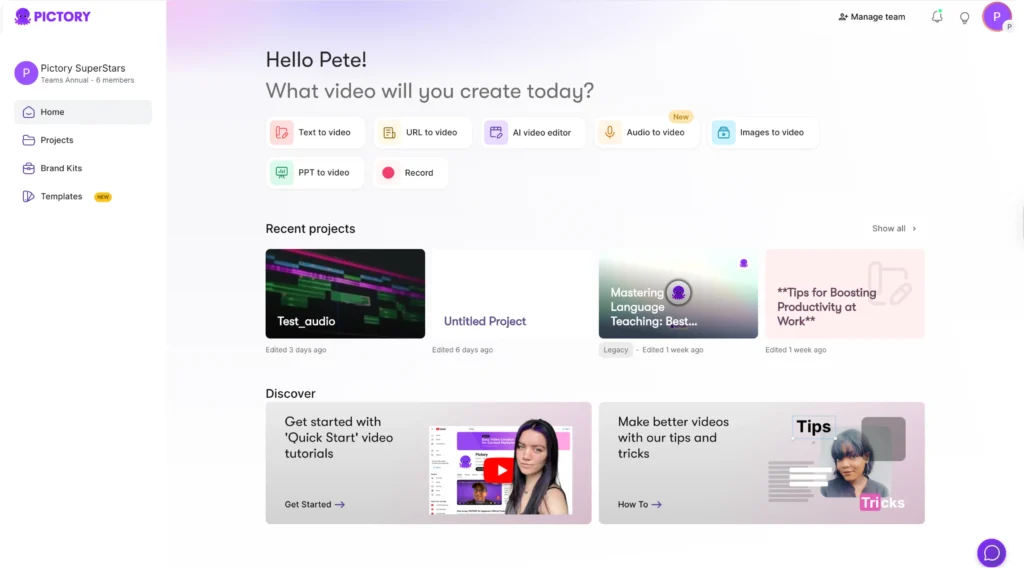
Pictory offers:
- Script to video creation
- Article to video creation
- Automatic scene building
- Voice generation
- Video editing with text control
- Access to stock media libraries
- Caption tools
These features help creators produce videos at scale. They also support teams that handle marketing, education, training, and social media.
AI Studio, Pictory’s Text to Image Generator
AI Studio is one of the most useful additions. AI Studio allows creators to generate AI images and videos from text prompts inside the same editor used to build the final video. This removes the need to open extra programs.
With AI Studio, creators can generate:
- Custom visuals for scenes
- YouTube thumbnails
- Social media graphics
- Video backgrounds
- Concept art
- Unique creative assets
This gives teams more control over the final look of their content.
How AI Studio Improves Workflows
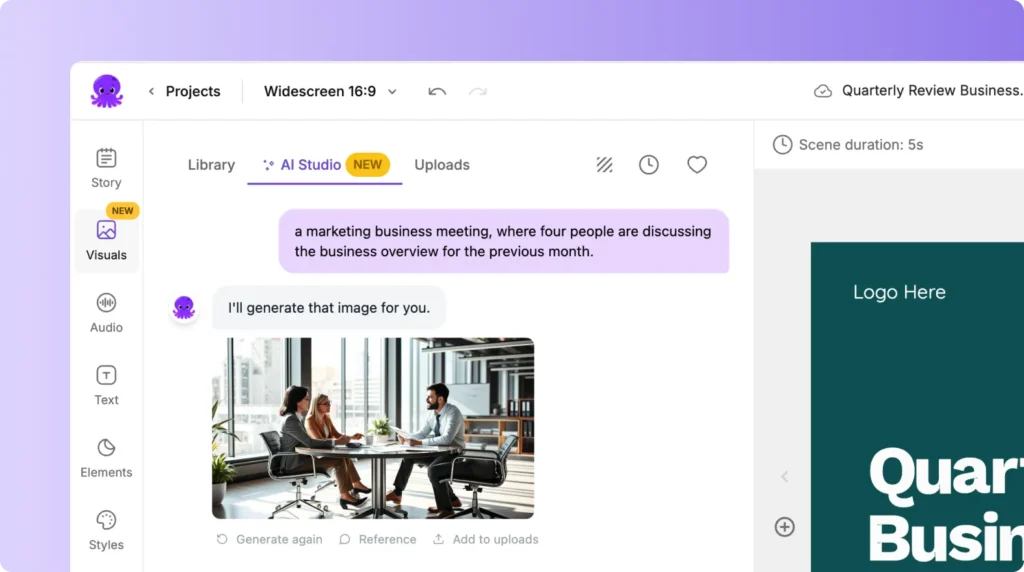
Creators often need specific visuals. Stock libraries do not always provide the right image. Before tools like AI Studio, creators had to use separate image generators, download results, and upload them back into the video editor. This slowed the workflow.
AI Studio removes these steps. A creator types a prompt, reviews options, and places the asset into the scene. This makes production faster and more consistent.
How Pictory Handles Text to Video Conversion
Pictory follows a simple structured flow. A user writes or imports a script. The tool breaks the text into scenes. The editor then displays matching visuals. The creator keeps what works or swaps in new content. This process makes video creation more predictable.
Scene Creation
Pictory builds scenes with a clear structure. Each scene contains:
- Text
- Visuals
- Audio
- Timing
The editor offers drag and drop control. A creator can adjust text placement, change the background, or add voiceovers.
Voice Options
Pictory provides a set of synthetic voices. They support different tones and styles for marketing, education, narration, and support videos. Human voice upload is also available.
Timeline Editing
The timeline supports trimming, rearranging scenes, and fine tuning transitions. These tools help creators handle long formats such as webinars, training modules, and client presentations.
How Pictory Compares With Other Text to Video Tools in 2026
Several other platforms appear in searches for text to video creators in 2026. Many offer basic prompt to video output. These systems generate complete videos from short text inputs. While this can produce quick ideas, the results often need editing.
Pictory focuses on clarity and control. It gives creators more structure and freedom to edit. This helps teams that want predictable quality.
Strengths include:
- Stable editing environment
- Integrated AI image generation
- Strong script to scene tools
- Clear timeline layout
- Easy export formats
This combination supports both short clips and long projects.
Use Cases for Pictory AI Studio
Marketing Teams
Marketing teams produce ads, product videos, testimonials, landing page media, and explainer videos. Pictory supports large batches of content and provides quick refreshes for campaigns.
YouTube Creators
Creators on YouTube need scripts, thumbnails, and short cuts from longer content. AI Studio helps with visuals. The editor also supports captions and brand consistency.
Social Media Managers
Short form content is easy to produce with Pictory. The system allows rapid resizing for TikTok, Instagram, Facebook, and LinkedIn.
Educators and Trainers
Trainers and educators use Pictory to convert lesson plans, articles, instructions, and course notes into video modules. Consistent visuals and narration help students follow the material.
Business Teams
Sales teams, support teams, and HR departments use Pictory to create internal guides and customer content.
SEO Impact of Text to Video Tools in 2026
Search behavior in 2026 rewards video. Video improves page engagement and can increase time on site. Adding video to articles, product pages, and guides helps brands appear more active. Pictory supports fast production of videos for blogs and landing pages.
How to Get the Best Results With Pictory AI
Write a Clear Script
A strong script is the foundation for a strong video. Use short sentences and clear ideas. The system builds scenes from this structure.
Use AI Studio To Fill Visual Gaps
When you cannot find the right stock image, generate one with AI Studio. This helps maintain brand style and theme consistency.
Use Brand Settings
Keep colors, fonts, and layouts aligned with your brand.
Adjust Scene Timing
Review each scene and adjust timings to match narration or pacing.
Export Multiple Versions
Produce versions for different platforms. This improves reach across channels.
Future Trends for Text to Video Tools
In 2026, text to video tools continue to grow as more companies adopt video content. Trends include:
- Higher quality synthetic actors
- More accurate scene generation
- Integrated asset creation
- Real time collaboration
- Improved audio tools
Platforms that integrate both video and image generation have an advantage. Pictory AI Studio fits this pattern.
FAQs About the Best Text to Video Creator 2026
What makes Pictory a strong text to video tool for 2026?
Pictory offers integrated script to video tools, AI image generation, clear editing controls, and support for multiple formats. This helps creators complete projects faster with more control.
Can I generate images inside Pictory?
Yes. AI Studio allows you to generate images and videos from text prompts inside the editor. This eliminates the need for external image generators.
Is Pictory good for YouTube creators?
Yes. Pictory helps creators make YouTube videos, shorts, and thumbnails. AI Studio also produces custom graphics for scenes.
Can Pictory handle long videos?
Yes. Pictory supports long form editing, transcripts, scene detection, and captioning.
Does Pictory support social media sizes?
Yes. You can export in multiple aspect ratios and create separate versions for each social platform.
Can teams collaborate inside Pictory?
Pictory supports shared workflows for teams that need joint access to projects. This helps marketing groups and training departments.
Text to video creation in 2026 continues to evolve. Pictory AI Studio stands out due to its integrated workflow. Its text to video tools, timeline editing, and built in AI image generator support creators who want clear control and fast production. This makes Pictory a strong option for anyone who needs consistent video output at scale.