TL;DR
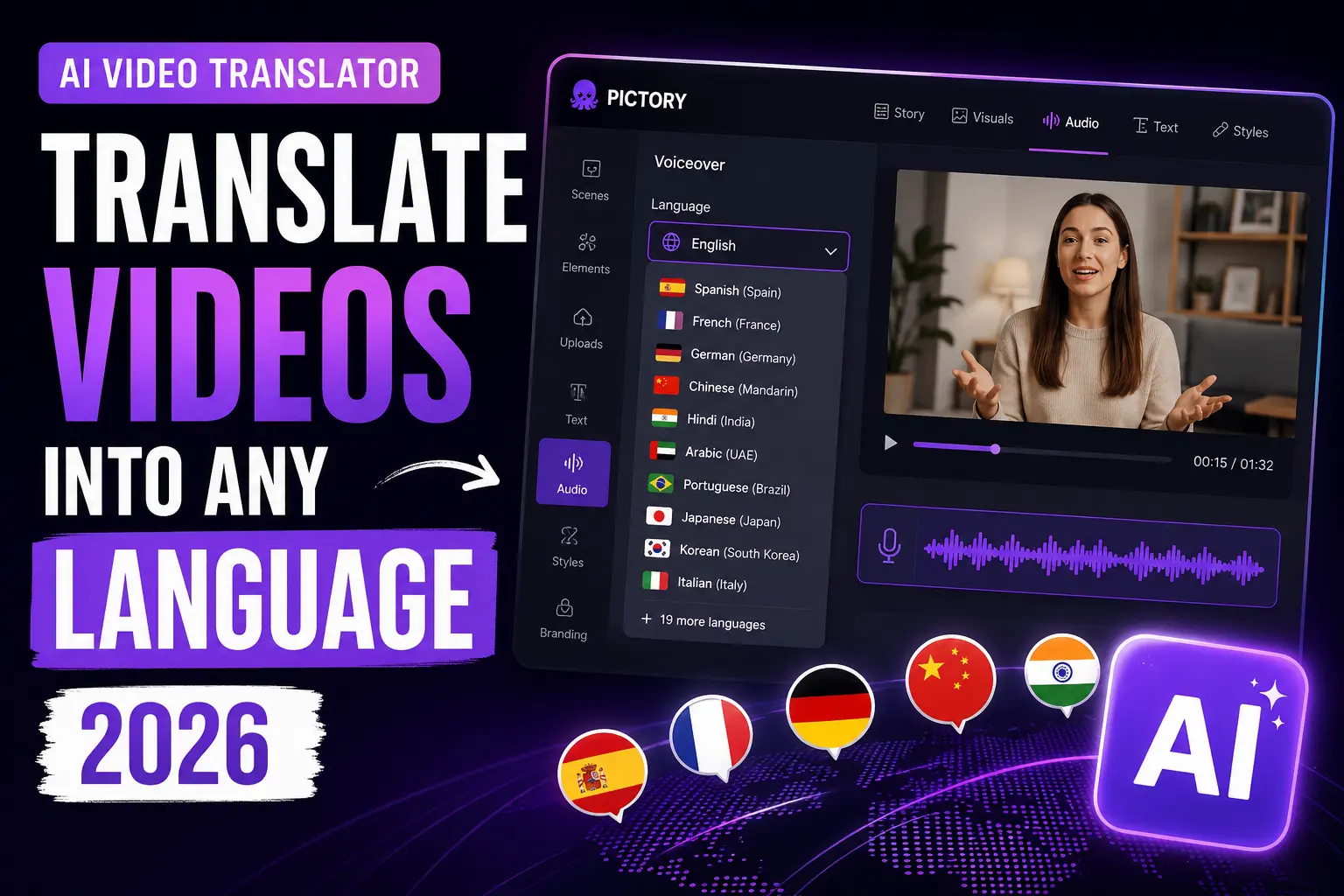
An AI video translator turns your existing video content into multilingual versions in minutes, replacing voiceovers and syncing captions in a target language. Pictory gives you translated scripts, multilingual AI voiceovers in 29 languages, and matching subtitles from one platform. If your team is producing content only in English, you’re invisible to roughly 74% of the internet. Here’s how to fix that without a production budget or a translation agency.
You published a great video. You put time into the script, the visuals, the voiceover. And now it’s reaching roughly a quarter of the internet. Only 25.9% of internet users worldwide speak English, which means the other 74% are watching in their own languages. Pictory translates the content you’ve already made into AI voiceovers and synced subtitles, so you don’t have to rebuild it for every market.
What Is an AI Video Translator?
An AI video translator is a tool that converts spoken or scripted content in a video from one language into one or more others, replacing or adding voiceovers and generating matching subtitles automatically.
The traditional alternative is a human-led localization pipeline: transcribe the video, send it to a translation agency, hire voice talent in each language, re-edit the audio, and re-sync the captions. A single video into three languages could take a week and cost several thousand dollars. AI tools compress that process into minutes. The AI video translation market is expected to grow from $2.68 billion in 2024 to $33.4 billion by 2034, growing at a 28.7% annual rate, which tells you roughly how fast businesses are making this shift.
75% of consumers are more likely to engage with and purchase from content available in their native language. Sonix, 2026
Modern AI translators handle more than word swaps. They translate at the script level, generate synthetic voiceovers in the target language using AI voice models, and produce time-synced captions that match the translated audio. The result is a video built for its audience rather than retrofitted for them.
How Does Pictory Translate Videos into Other Languages?
Pictory gives you three translation tools that work together: script translation with Ask AI, multilingual AI voiceovers, and multilingual subtitles. You can use them independently or combine all three for a fully localized video.
Translate your script with Ask AI
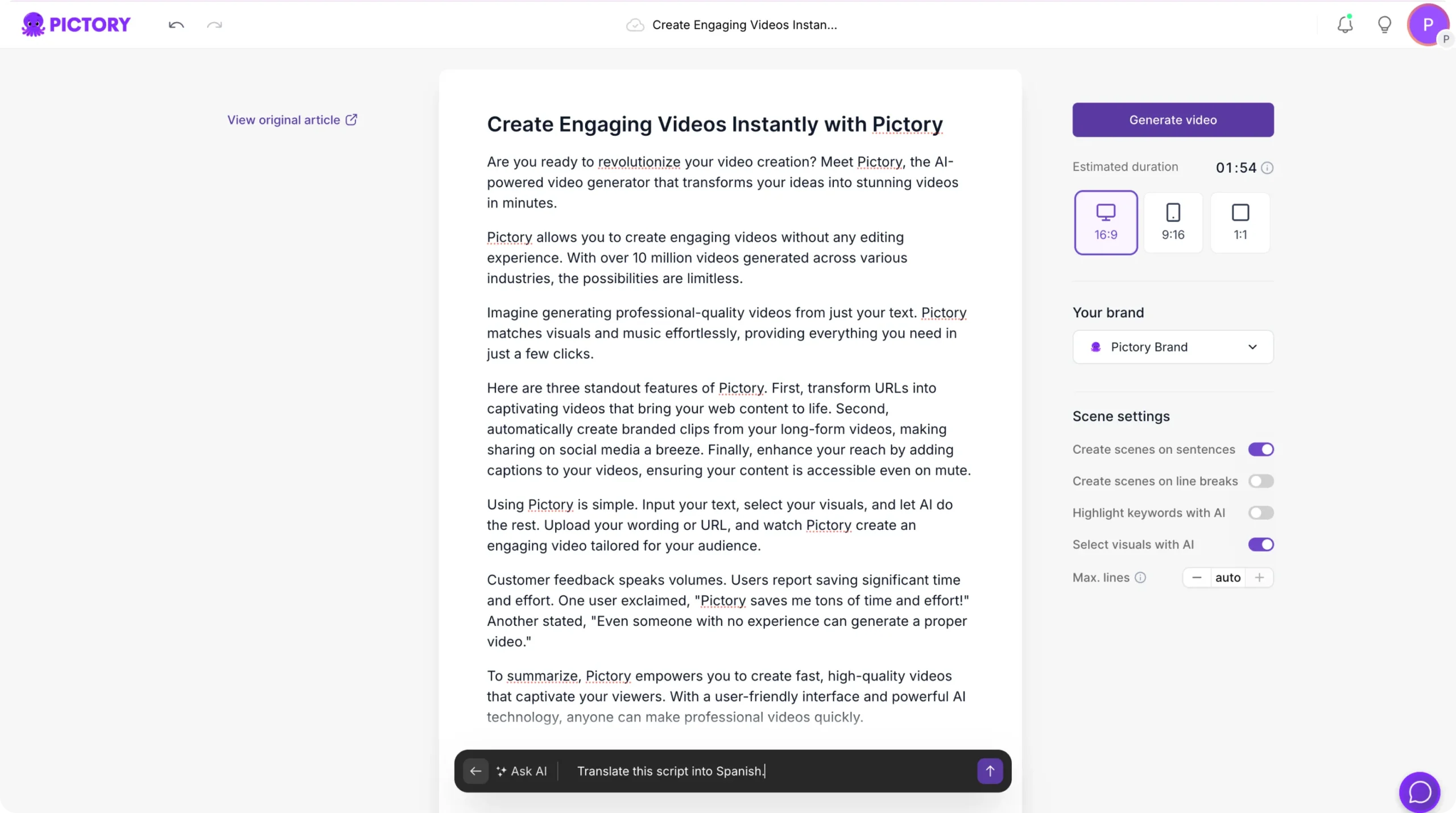
Inside the Script Editor, click Ask AI and type a simple instruction, such as “Translate this script into Spanish.” Pictory rewrites the full script in the target language instantly. You can then review and edit the translation before generating any visuals. This works in both the Text to Video and URL to Video workflows. The full guide is available at the Pictory Academy: Translate Script with Ask AI.
Select a multilingual AI voiceover
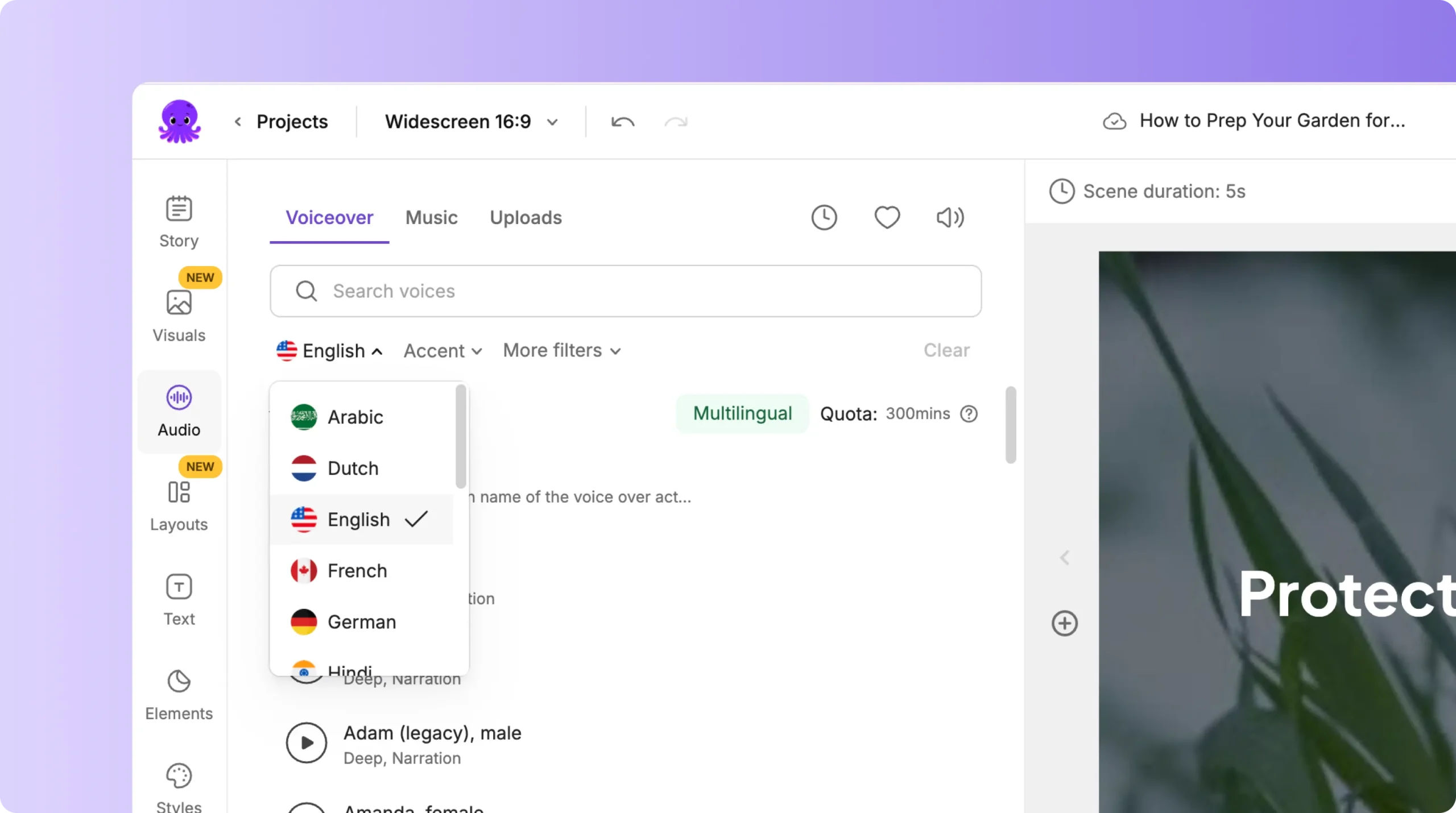
Open the Audio tab, go to Voiceover, and select a language and accent. Pictory’s premium voices, powered by ElevenLabs, support 29 languages and are fully multilingual, meaning you can apply the same voice across all your language versions for consistency. Standard plan users have access to seven languages, including English, French, Spanish, German, Dutch, Italian, and Portuguese.
Add multilingual subtitles
Translate your captions into the target language and choose a subtitle style from the Styles library. Pictory auto-syncs subtitles to your translated script, and you can customize font size, color, line count, and placement. You can also burn in subtitles so they’re visible on every platform, including social feeds where autoplay runs without sound. See the full walkthrough at Pictory Academy: Multilingual Subtitles.
Preview and export your localized video
Play back the video inside the editor to check translation quality, subtitle timing, and voiceover pacing. When it looks right, download the finished video. You can repeat the workflow to produce additional language versions from the same source project without rebuilding scenes or reapplying your brand kit.
What Languages Does Pictory Support?
Pictory’s voiceover language coverage depends on your plan.
Standard Plan
English, French, Spanish, German, Dutch, Italian, Portuguese. Seven languages included at no extra cost.
Professional and Teams Plans
29 total languages with ElevenLabs premium voices. The same voice model works across all 29, so your brand voice stays consistent in every market.
In the weeks after Pictory launched multilingual voiceover support, the community created nearly 30,000 videos in newly supported languages, making it one of the fastest-adopted features on the platform.
For subtitle translation, Pictory supports a broader set of languages than voiceover alone. You can translate captions into any language supported by the platform, apply a style from the library, and export burned-in subtitles for guaranteed visibility on every channel. See the full language list at the Pictory Help Center.
Why Does Video Translation Matter for Social Media Marketers?
Video has become the default content format, with 91% of businesses using video as a marketing tool in 2026, according to Wyzowl’s annual State of Video Marketing report. But most of that video stays in English, which means most of that investment reaches a fraction of available audiences.
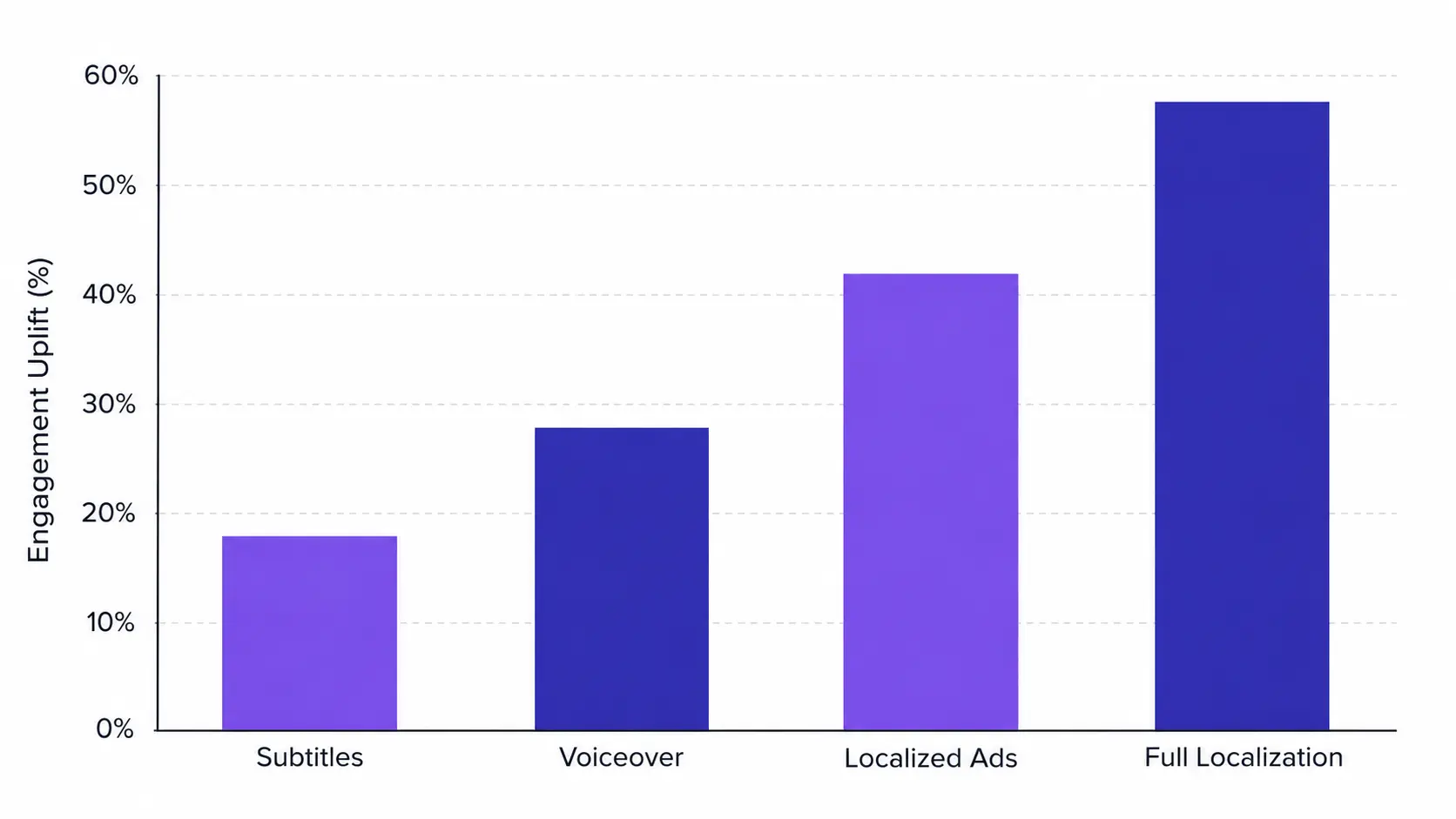
The data on multilingual content is consistent. 75% of consumers are more likely to engage with content in their native language, and that preference drives purchase decisions too. 76% of online buyers prefer to purchase from sites in their own language, a preference that extends directly to video-based product content.
For social media managers and digital marketers, translation extends the reach of content you’ve already made. One well-produced video becomes five or six language-specific assets, each one ready to perform on regional feeds, language-targeted ad sets, or market-specific YouTube channels. Pictory’s 2026 State of the AI Video-Creation Industry Report, which analyzed more than 1.5 million videos created on the platform, found that professional users are adopting content repurposing workflows at nine times the rate of personal users, and multilingual voiceover is part of that shift.
How Does AI Video Translation Compare Across Tools?
The market for AI video translation has grown quickly, and different tools have taken different approaches. These are the main options for teams focused on content creation and repurposing.
Pictory
Script translation with Ask AI, 29-language multilingual voiceovers with ElevenLabs, multilingual subtitles with style customization, and full brand kit application. Works across Text to Video, URL to Video, Audio to Video, and PPT to Video workflows. No lip-sync on existing footage, but your brand voice and visual identity stay consistent across every language version you produce.
HeyGen
Specializes in translating existing footage with lip-sync re-rendering in 175+ languages. Strong for talking-head videos where the speaker’s face is on camera and lip movement needs to match translated audio. Best for personalized outreach and spokesperson content rather than content repurposing workflows.
Synthesia
Supports 140+ languages for avatar-led videos. One-click translation is available but restricted to Enterprise tier. Pricing for that tier is custom. Strong for corporate training and L&D teams building new content from scripts rather than repurposing existing assets.
VEED
Browser-based video editor that includes multilingual dubbing and voice matching as added capabilities. A solid option for social media teams already handling editing, captions, and publishing in a single tool. AI dubbing is a paid feature with no free tier.
The right choice depends on what you’re translating. If you’re taking existing content (scripts, blog posts, audio files, recordings, or slide decks) and localizing it for new markets, Pictory’s workflow is the most complete. If your primary need is re-rendering footage of a real on-camera speaker with lip-sync in a new language, HeyGen is purpose-built for that.
Which AI Video Translator Should You Choose?
How to Get the Most from Pictory’s Translation Features
A few habits keep multilingual content quality consistent when you’re producing at scale in Pictory.
Review translations before generating visuals. The Ask AI translation tool produces clean results, but a quick human review before you click Generate Video catches any phrasing that doesn’t land naturally in the target language. Read the translated script out loud or paste it into a text-to-speech preview to check flow.
Pair translated voiceovers with translated subtitles. 75% of consumers are more likely to engage with content in their native language. Subtitles extend that effect to silent viewers, which matters on social platforms where autoplay is muted by default. Combining both gives you the full uplift.
Apply your brand kit before exporting. Your logo, colors, and fonts should carry over into every language version. Apply your brand kit inside the Branding tab before downloading any localized video. The Pictory Academy has a step-by-step brand kit guide if you haven’t set one up yet.
Use the Subtitle Translator for existing videos. If you already have a finished video and just need translated captions, Pictory’s Subtitle Translator lets you upload your subtitle file, select a target language, and generate accurate translations. You can review and edit the output before applying it, and pair it with an AI voiceover in the same language.
Your content is already done. Now make it multilingual.
Translate your scripts, apply AI voiceovers in 29 languages, and add synced subtitles, all inside Pictory. Fast, scalable, affordable.
Is an AI Video Translator Worth It for Your Team?
If your team produces video content and publishes it only in English, you’re already missing a substantial share of your potential audience. AI tools now reduce localization costs by up to 15 times compared to traditional studio workflows, and production time drops from days to minutes. The real question is which tool fits the workflow you actually have.
Pictory is the right fit if your primary challenge is content repurposing: converting scripts, URLs, audio files, recordings, or slide decks into professional branded videos, then publishing those videos across markets. The translation tools live in the same platform you’re already using to create content. The limitation is that Pictory doesn’t re-render lip movements on existing footage of a human speaker. If that’s your core requirement, HeyGen is the specialist for that job.
For most social media managers, digital marketers, and educators who need to scale content across languages without scaling headcount or budgets, Pictory takes you from source content to published multilingual video. See how digital marketing teams use Pictory, or start a free trial and run your most common content format through the translation workflow today.
Start translating your videos today
Script translation, multilingual voiceovers, and subtitles, all in one platform. No video editing skills required.
FAQ: AI Video Translator
![[Article] Promo Video: How to Make One That Converts](https://pictory.ai/wp-content/uploads/2026/09/blog-video-promo-300x169.webp)