Pictory helps professionals and teams turn scripts, blogs, presentations, recordings, and audio into professional video using AI. LinkedIn Verified Capabilities recognizes real product proficiency based on platform usage.
TL;DR
Pictory is an AI video creation platform that turns scripts, blog posts, presentations, recordings, and audio into polished, branded video — no editing skills or production team required. LinkedIn’s Verified AI Capabilities program certifies real proficiency based on actual platform usage. A Pictory verified capabilities badge on your LinkedIn profile means you have demonstrated, hands-on ability to create professional video at scale using AI workflows.
What is Pictory?
An AI video creation platform.
Turns scripts, blogs, presentations, recordings, and audio into polished, branded video — no editing experience needed.
What is a Verified Capability?
A LinkedIn credential based on real product usage.
LinkedIn’s Verified AI Capabilities program certifies members based on how they actually use the product — not a test or self-reported claim.
What does it prove?
Hands-on proficiency with AI video workflows.
When you see the badge, it reflects genuine, demonstrated ability to create professional video at scale using AI.
How Pictory LinkedIn Verification Works
1
Connect LinkedIn
Your LinkedIn account connects to Pictory through the Verified AI Capabilities program.
2
Pictory Validates Usage
Pictory validates your usage and capabilities based on real platform activity.
3
LinkedIn Displays
LinkedIn displays your verified capabilities in the Licenses & Certifications section.
4
Build Credibility
You gain professional credibility with employers, clients, and collaborators.
Why LinkedIn Verified Capabilities Matter
Professional Credibility
Show employers and clients that your AI video capabilities are verified through real platform usage — not self-reported.
Career Visibility
Verified capabilities appear directly on your LinkedIn profile, making you discoverable to recruiters searching for AI video expertise.
Verified Workflow Expertise
Each capability is tied to a specific Pictory workflow, proving hands-on experience with the tools that matter most in modern content production.
Who Uses Pictory for AI Video Creation?
Pictory helps teams produce more video without requiring editors or production teams.
Marketing Teams
L&D Teams
Content Creators
Sales Enablement
Internal Comms
Agencies
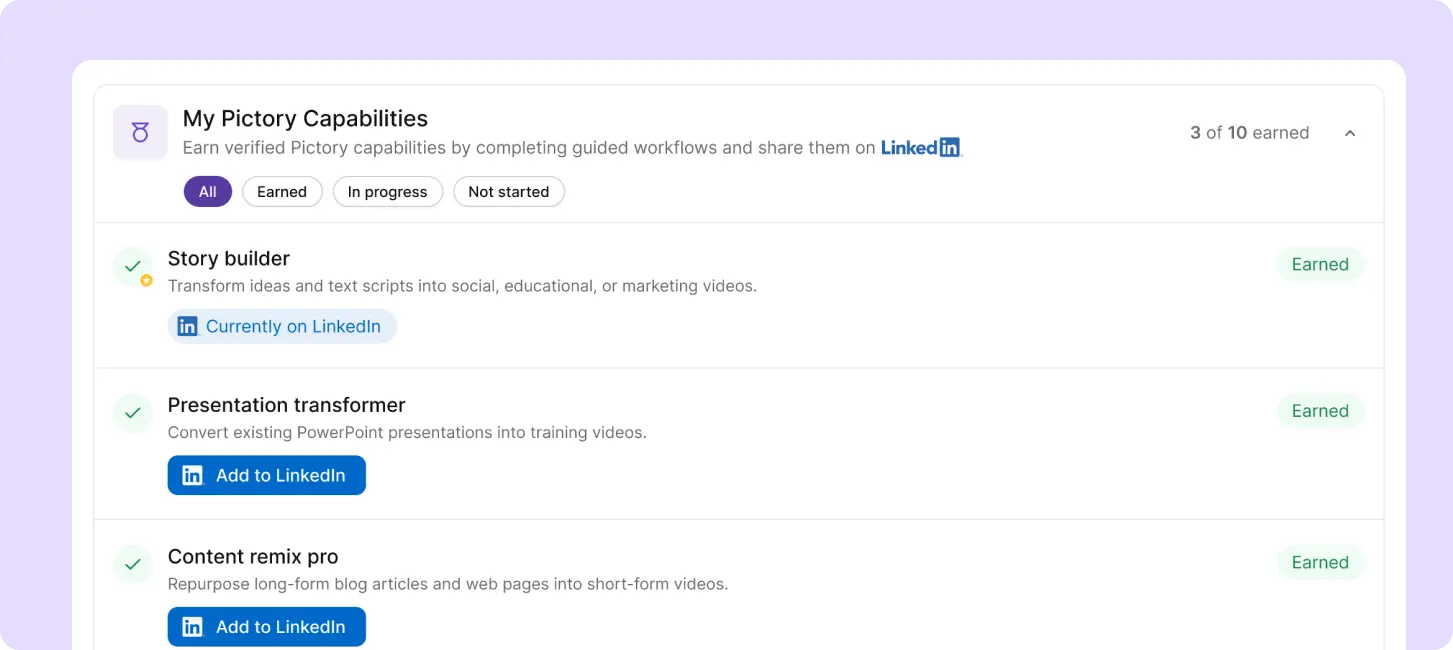
Pictory My Capabilities — your verified AI video creation capabilities dashboard
What AI Video Capabilities Can You Verify with Pictory?
Pictory recognizes ten distinct video creation capabilities, each tied to a specific workflow inside the platform. Expand any capability below to see exactly what it covers and the steps required to earn it.
What Teams Create With Pictory AI
Social
Social Content
Turn scripts, blogs, and long-form recordings into short-form videos for LinkedIn, YouTube, Instagram, and TikTok.
Training
Training & Learning Programs
Transform PowerPoint decks, session recordings, and lesson scripts into training videos with captions and clear narration. Explore the training video generator.
Marketing
Marketing & Sales Enablement
Convert campaign messages, presentations, webinars, and articles into branded videos for demand generation and customer education.
Demos
Tutorials & Product Demos
Record your screen, remove filler words, add captions, and produce clear professional product walkthroughs. No video editing background needed.
Core Video Creation Capabilities
Pictory automates video assembly, captions, transcript editing, voiceovers, and branding so teams can produce video without traditional editing software.
Create Video from Text
Turn any script or idea into a complete video with AI-generated scenes, captions, visuals, and voiceovers. Use the built-in AI script generator or drop in your own.
Repurpose Existing Content
Paste any blog URL. Pictory extracts key content, generates a script, and builds a storyboard ready to export.
Edit Video Using Transcripts
Remove filler words, cut silences, adjust subtitles — edit by editing the text. No timeline needed. See how it works.
Turn Presentations & Recordings into Video
Upload a PowerPoint or recording. Pictory converts it into a polished training or marketing video. Learn more.
Collaborate with Teams
Shared workspaces, brand kits, reusable templates, client review links, and approval workflows keep output consistent at scale.
Audio & Podcast to Video
Turn podcasts, webinars, and audio recordings into complete video episodes with transcription, matched visuals, and captions.
Why Teams Choose Pictory for AI Video
Speed
Most teams go from raw content to a publish-ready video in one session. No handoffs, no specialist required.
Scale
Turn a webinar into a LinkedIn post. Convert a blog into a short explainer. Pictory handles the formatting across every channel.
Collaboration
Shared projects, brand kits, reusable templates, and approval workflows keep output consistent across campaigns and client accounts.
No Editing Expertise Needed
AI-assisted scene assembly, captions, transcript editing, voiceovers, and branding do the heavy lifting automatically.
Connect LinkedIn and Start Creating
Link your LinkedIn account to Pictory, complete the workflows, and earn verified AI video capabilities you can showcase on your profile.
Frequently Asked Questions About Pictory AI Video and LinkedIn Verified Capabilities
What does Pictory’s AI video creation platform do?
Pictory helps you turn scripts, blog posts, PowerPoint presentations, recordings, podcasts, and web pages into professional videos using AI. The platform automates editing, captions, voiceovers, branding, and scene creation so you can produce videos without advanced editing skills.
How does text to video work in Pictory?
You can paste a script, idea, or written content into Pictory. The platform automatically generates scenes, visuals, captions, voiceovers, and music to create a complete video ready for publishing.
Can I convert blog articles and web pages into video?
Yes. Pictory can transform blog posts, articles, and web pages into video content by extracting key points, generating a storyboard, and matching visuals to the script automatically.
Can I edit a video using its transcript?
Yes. Pictory includes transcript-based editing, which allows you to edit video by editing text. You can remove filler words, cut sections, shorten pauses, and update captions without using a traditional video timeline.
How does Pictory support team and client workflows?
Pictory includes shared workspaces, brand kits, reusable templates, approval workflows, and collaboration tools that help teams and agencies produce consistent video content at scale.
What are LinkedIn Verified AI Capabilities?
LinkedIn Verified AI Capabilities are credentials that validate real product proficiency based on actual platform usage. Pictory verifies that users have completed and demonstrated hands-on workflows inside the platform before the capability appears on their LinkedIn profile.
How do I earn a Pictory verified capability badge?
You earn a capability badge by connecting your LinkedIn account to Pictory and completing the required workflow associated with a specific capability. Pictory validates platform usage and LinkedIn displays the credential in your profile's Licenses & Certifications section.
Can I display multiple Pictory capability statements on my LinkedIn profile?
At this time, LinkedIn only allows one Pictory capability statement to appear on your profile at a time. If you add a new capability it will replace your previously displayed capability. Your completed capabilities are still recognized inside Pictory, but only one can currently be shown on LinkedIn simultaneously.
Do I need video editing experience to use Pictory?
No. Pictory is designed for marketers, educators, creators, agencies, and business teams who want to create professional videos without traditional editing software or production experience.
What types of videos can I create with Pictory?
You can create social videos, training videos, marketing explainers, sales enablement content, podcast videos, tutorials, product demos, webinar highlights, and internal communication videos.
More From Pictory
Promo Video: How to Make One That Converts
How to Create a Slideshow with Music and Video
Can ChatGPT Make Videos in 2026? The Honest Answer
Harness the power of AI and amazing video creation tools to grow your audience while saving you time!



![[Article] LinkedIn + Pictory’s AI Video Creation Capabilities](https://pictory.ai/wp-content/uploads/2026/06/linkedin-pictory-ai-video-creation-capabilities.webp)
![[Article] Promo Video: How to Make One That Converts](https://pictory.ai/wp-content/uploads/2026/09/blog-video-promo-300x169.webp)