Pictory and OpusClip both help you make more video with less effort, but they start from different places. OpusClip takes long recordings and extracts short viral clips for TikTok, Reels, and YouTube Shorts. Pictory creates video from scratch — from scripts, blog posts, URLs, or audio — with AI Avatars, generative visuals from AI Studio, brand kits, and stock media all in one place. If you need to clip existing footage fast, OpusClip delivers. If you need to build video from written content or ideas, Pictory is the tool. This guide breaks down exactly where each fits so you can choose right.
You’ve got more content than you have time to turn into video. That’s the problem both Pictory and OpusClip are trying to solve — just from opposite ends.
The short-form video market is relentless. YouTube Shorts alone generates over 200 billion daily views, and brands that post consistently outpace those that don’t. The challenge isn’t knowing video matters. It’s finding a workflow that makes production sustainable.
That’s where AI video tools come in. But Pictory and OpusClip are not the same tool. Picking the wrong one for your workflow means extra manual work, not less.
Here’s the breakdown.
What Is Pictory and Who Is It Built For?
Pictory is a web-based AI video creation platform that builds finished videos from written content — no camera, no editing software, no video team required.
You paste a script, drop in a blog URL, upload an audio file, or describe an idea. Pictory’s AI generates a storyboard, selects relevant visuals from Getty Images and Storyblocks, adds captions, and generates an AI voiceover. The result is a branded, share-ready video in minutes.
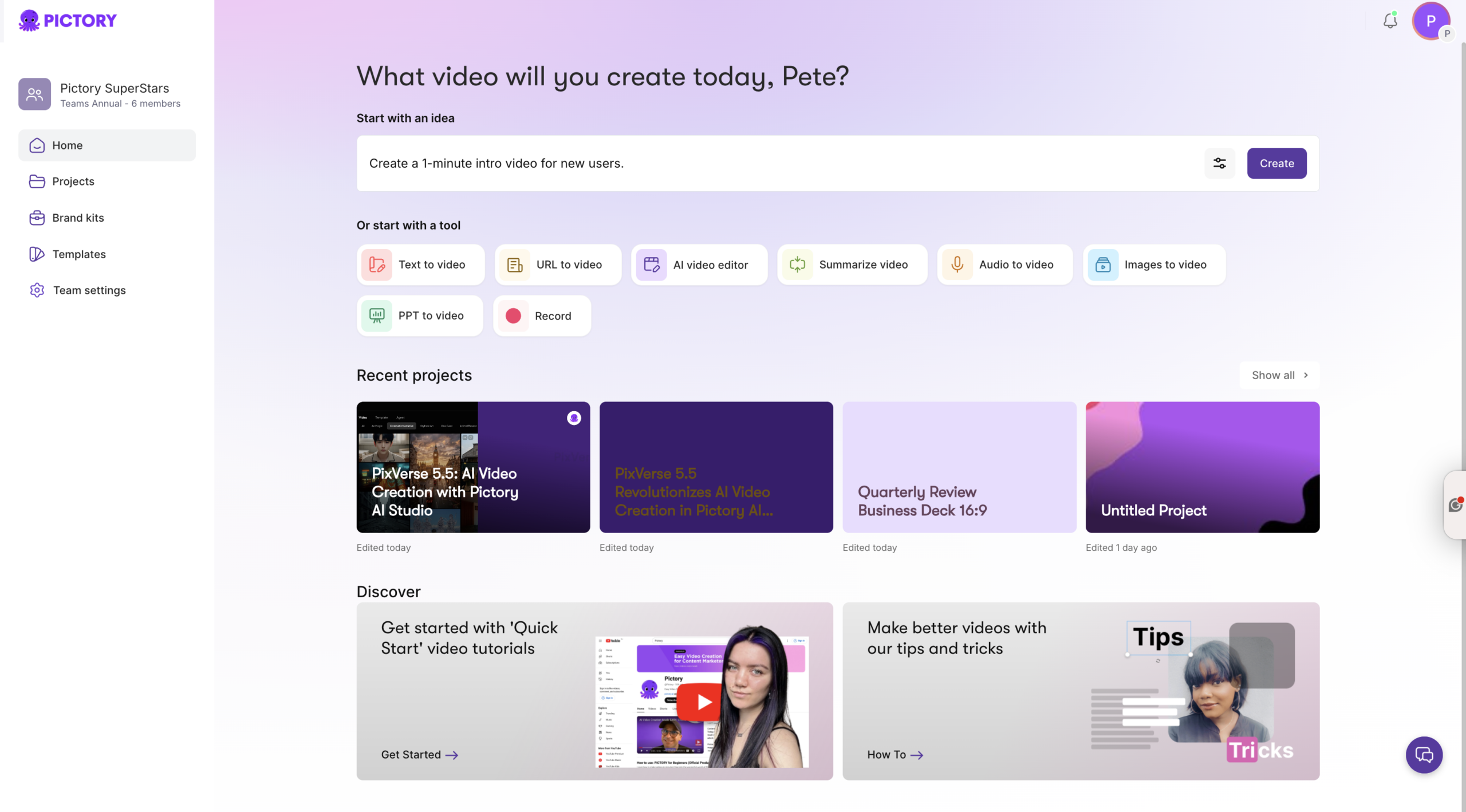
With Pictory 2.0, the platform now covers the full video lifecycle. Create from text or ideas, edit existing footage with AI tools, apply saved brand kits to every output, add AI Avatars as on-screen presenters, and generate custom visuals through AI Studio — all from one subscription.
Pictory suits digital marketers, content teams, social media managers, and learning and development professionals who need a steady, scalable output of professional video without a production overhead.
What Is OpusClip and Who Is It Built For?
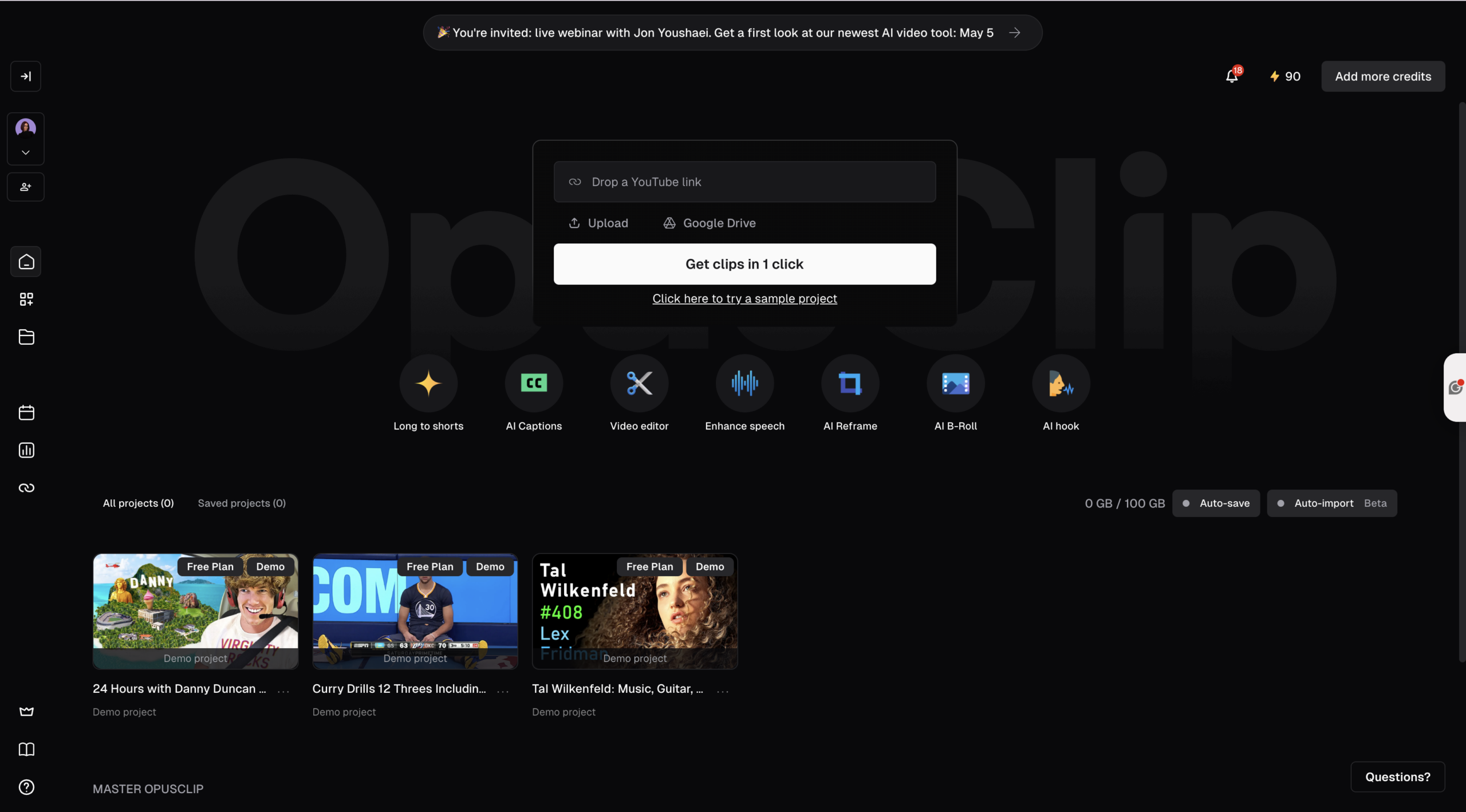
OpusClip (opus.pro) is an AI-powered video repurposing tool. You give it a long recording — a podcast, webinar, YouTube video, Zoom call, or Twitch stream — and its ClipAnything AI scans it, identifies the strongest moments, and outputs multiple short vertical clips ready for social media.
Each clip comes with captions auto-applied, aspect ratios optimized for TikTok (9:16), Instagram (1:1), or YouTube (16:9), and an AI Virality Score that predicts which clips are most likely to get views. On Pro plans you can add AI B-roll, apply a custom AI hook at the start, and schedule directly to YouTube, TikTok, Instagram, LinkedIn, Facebook, and X.
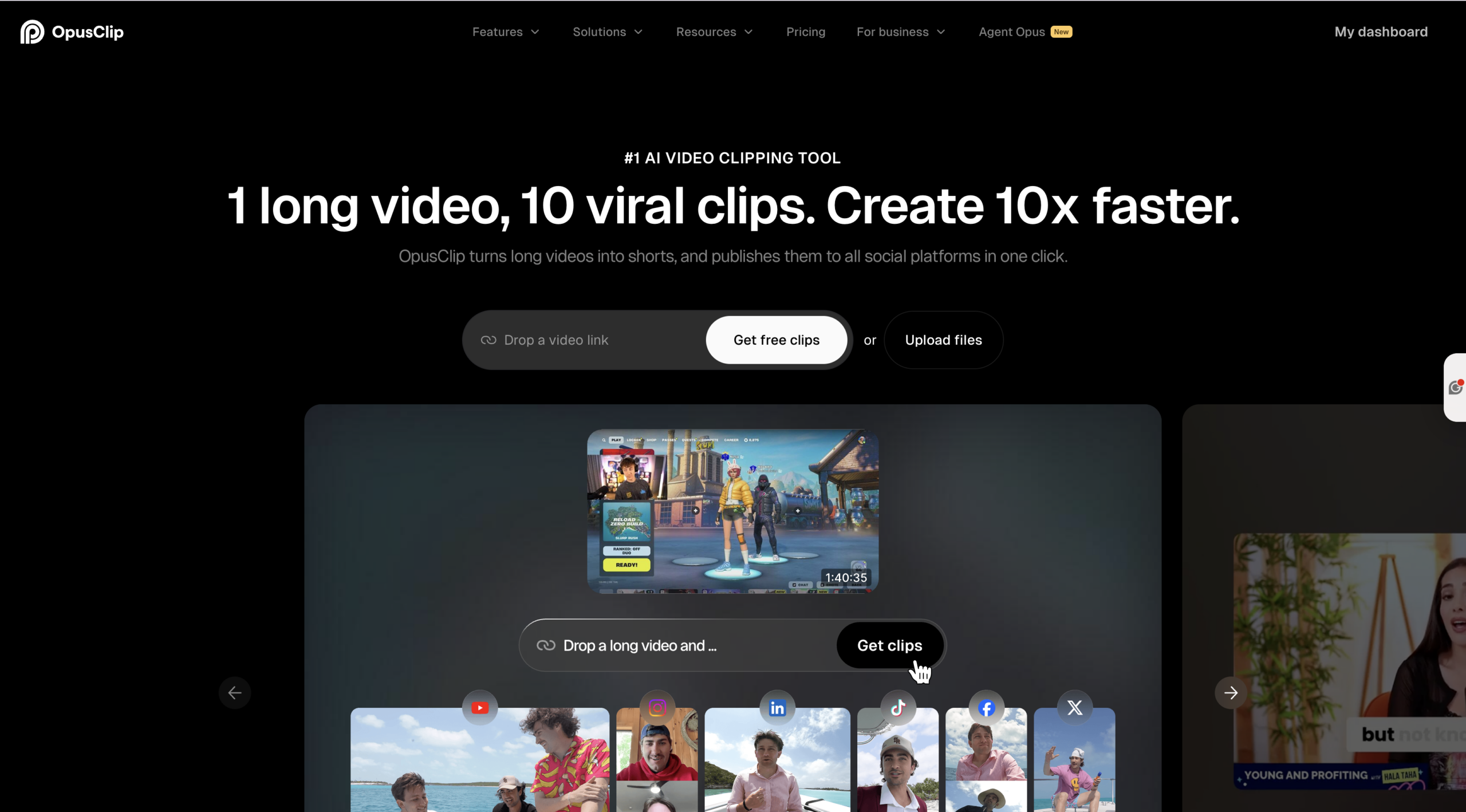
OpusClip is built for creators, podcasters, marketers, and agencies that produce regular long-form content and need to squeeze more social media output from it. As of 2026, over 16 million creators use the platform.
The honest limitation: OpusClip needs existing footage to work with. It clips video — it doesn’t create it.
Pictory vs OpusClip: Core Feature Comparison
The clearest way to understand the difference is to map where each tool starts. Pictory starts with text or an idea and builds a video around it. OpusClip starts with a long recording and extracts the best short moments from it. Here’s how every key feature compares.
| Feature | Pictory | OpusClip |
|---|---|---|
| Video creation from text / script | Core workflow — paste script or URL, get a finished video | Not available — requires existing footage |
| Long video to short clips | AI Video Editor auto-generates highlights and clips | Core workflow — ClipAnything AI finds viral moments |
| AI Virality Score | Not available | Rates each clip 0–100 for predicted social performance (paid plans) |
| AI Avatars | Built-in AI Avatars — lip-synced, per-scene control, no camera needed | Not available |
| Generative AI visuals | AI Studio — text-to-image, text-to-video, consistent characters | AI B-roll insertion (Pro plan) — contextual stock footage added automatically |
| URL to Video | Paste a blog URL, get a finished video | Not available |
| Auto captions | AI captions with style library, animations, multilingual support | Dynamic animated captions, 97%+ accuracy, 25+ languages |
| AI reframing for vertical | 16:9, 9:16, 1:1 aspect ratios | ReframeAnything — AI object tracking keeps subjects centered |
| Brand kits | Logo, colors, fonts — applied automatically | Brand templates on paid plans (up to 5 on Pro) |
| AI voiceovers | Multilingual AI voices, ElevenLabs on Pro+, upload your own | No AI voiceover generation — clips use audio from the source video |
| Social media scheduler | Export and API-based distribution via Zapier | Direct scheduling to YouTube, TikTok, Instagram, LinkedIn, X (Pro) |
| Screen / camera recording | Built-in screen and camera recorder | Not available |
| PPT to Video | Converts PowerPoint slides into narrated video | Not available |
| Export to NLE (Premiere / DaVinci) | Not available | Adobe Premiere Pro and DaVinci Resolve export (Pro) |
| Team collaboration | Shared brand kits, projects, and media on Teams plan | Team workspace with shared credits and templates (Pro) |
| Pricing model | Predictable by video minutes — from $25/mo (annual) | Credit-based by source video processed — from $15/mo (Starter, monthly) |
| Free tier | 3 full video projects, no card required | 60 processing minutes/month, watermarked exports, clips expire after 3 days |
| Best for | Marketers, L&D teams, content creators starting from text or ideas | Podcasters, YouTubers, social creators repurposing long recordings |
How Does Pictory AI Studio Change This Comparison?
OpusClip pulls visuals from the source recording — what’s already in the video is what you get. If the original footage is limited, the clips reflect that.
Pictory AI Studio removes that constraint entirely. Built directly into the Visuals tab of the Pictory editor, AI Studio lets you generate custom images from text prompts, create consistent characters using reference uploads, and produce AI video clips on demand.
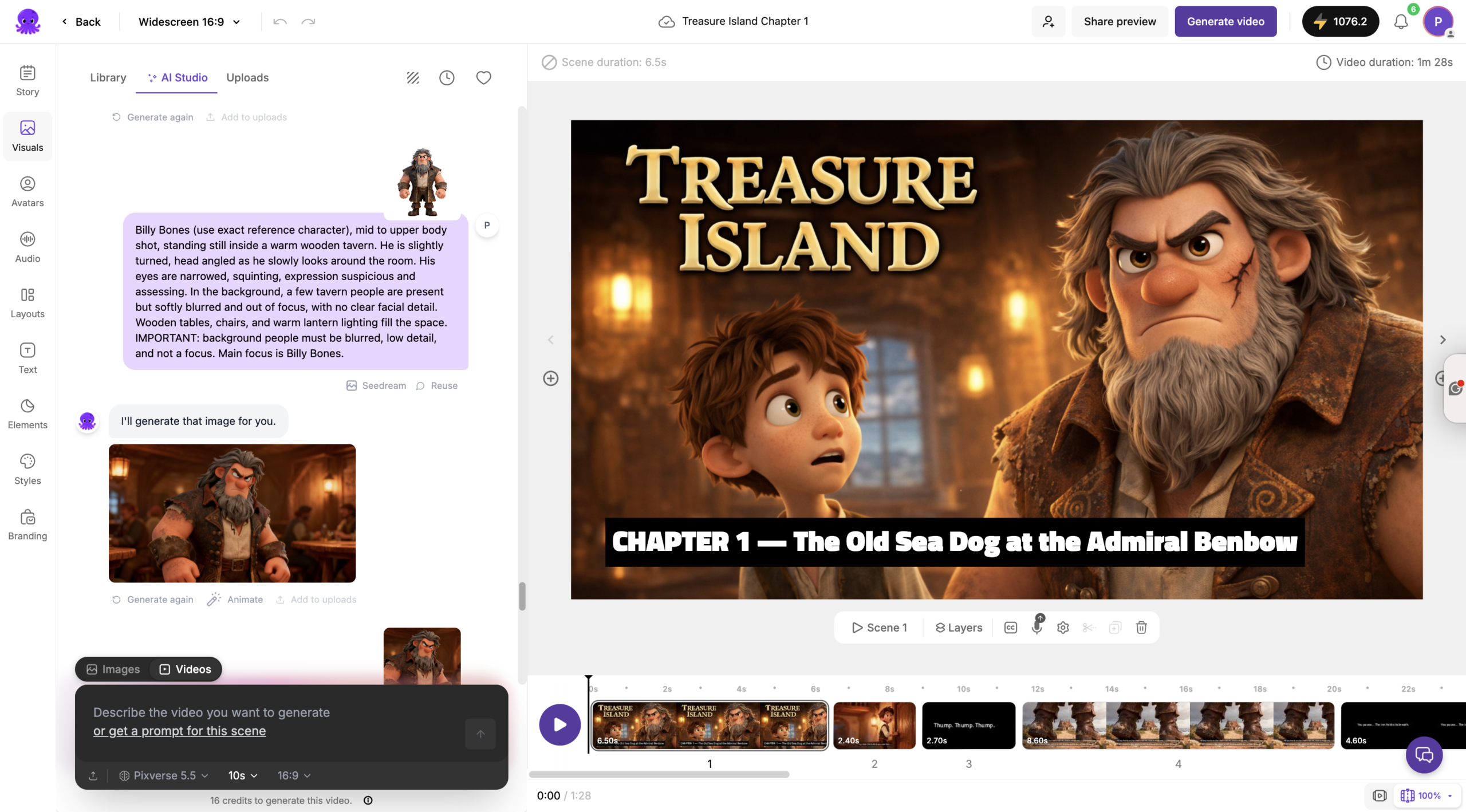
Need a futuristic office scene for your explainer? A specific product illustration? A brand-consistent character that appears across multiple videos? AI Studio generates it. You’re no longer limited to what exists in a stock library or what was captured on camera.
This matters for marketers creating content from blog posts, scripts, or ideas where there’s no source footage to draw from. And it matters for L&D teams who need professional-looking training videos without a filming budget.
OpusClip does add AI B-roll on its Pro plan — contextual stock footage dropped into clips automatically — but this supplements footage that already exists, not created from scratch.
What Are Pictory AI Avatars and Why Do They Matter?
Pictory AI Avatars are digital on-screen presenters you add directly to any video project. The avatar appears inside your scene, narrates your script using an AI voice, and is automatically lip-synced at export.
No camera. No microphone. No studio. The avatar maintains a consistent on-screen presence across every video — useful for training content, product walkthroughs, explainer videos, and internal communications where a human presence adds credibility but filming isn’t practical.
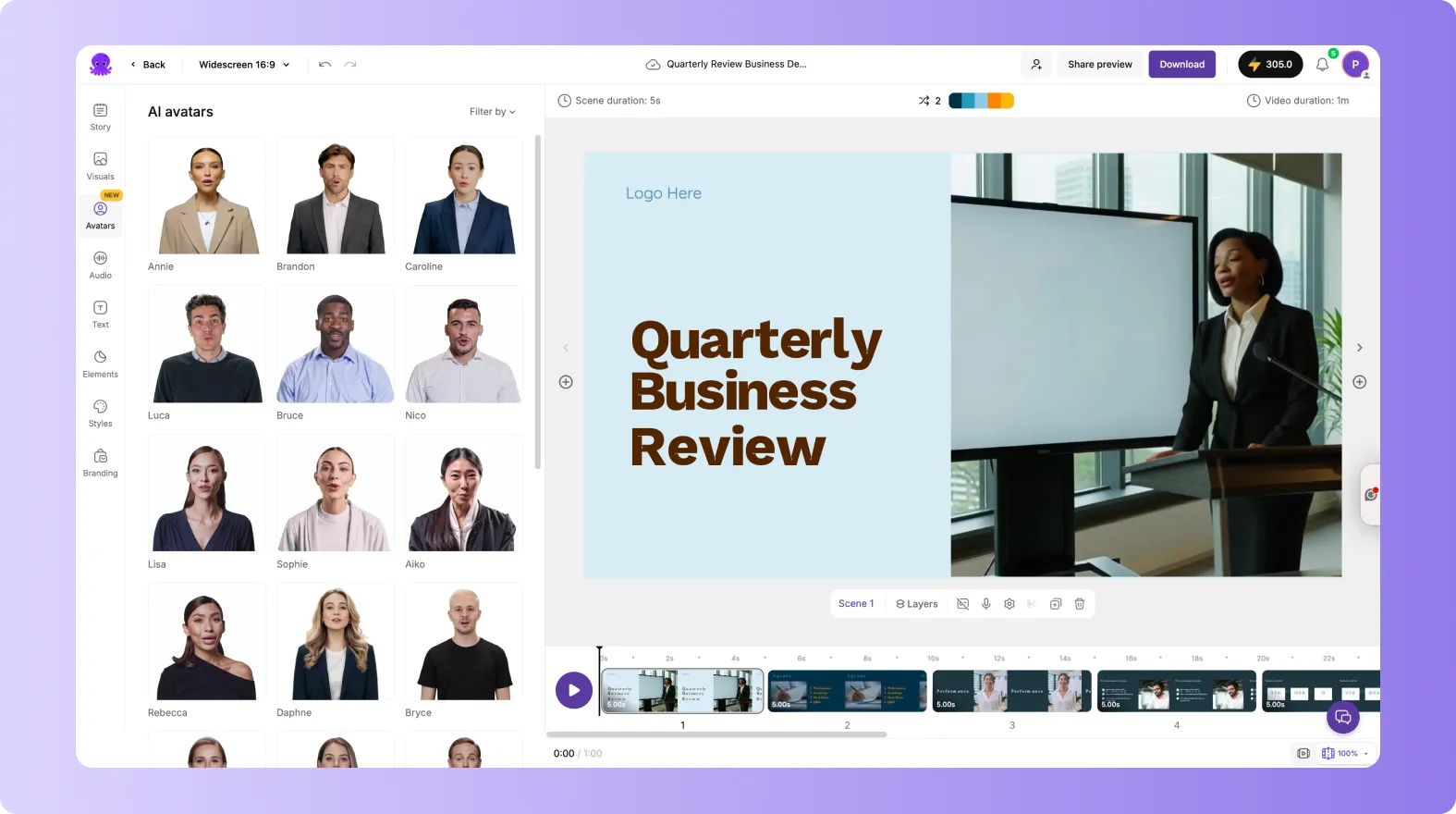
You control exactly how the avatar appears. Show or hide it per scene. Resize and reposition freely. Choose from different AI voices depending on language or audience. It works as an editable layer inside the Pictory video editor, integrated into the same workflow as everything else.
For learning and development teams this is particularly significant. You can produce professionally hosted training video without any on-camera recording — at scale, consistently branded, in multiple languages.
OpusClip has no equivalent to this feature. It works with what was filmed, not what can be generated.
Pictory vs OpusClip Pricing: What You Actually Pay
Pricing structures are fundamentally different between these two tools, which matters when you’re planning a content budget.
Pictory pricing runs on a tiered subscription model with four plans. The Starter plan is $29 per month (monthly) or $25 per month (annual), covering 1 user, 200 video minutes, 100 AI Credits, 5 GB storage, and 60 minutes of ElevenLabs AI voices. The Professional plan is $59 per month (monthly) or $35 per month (annual) and adds 600 video minutes, 1,000 AI Credits, 20 GB storage, 120 minutes of ElevenLabs voices, and access to 18 million Getty Images and Storyblocks assets. The Team plan is $199 per month (monthly) or $119 per month (annual) for 3+ users with 1,800 video minutes, 2,400 AI Credits, and 100 GB storage. Enterprise is custom for 10+ users. AI Credits for generative features like AI Studio and Avatars are included in each plan.
OpusClip pricing runs on a credit-based model where credits equal minutes of source video processed. The Free plan provides 60 processing minutes per month with watermarked exports that expire after three days and no editing tools. The Starter plan is $15 per month (monthly only) for 150 processing minutes, watermark-free exports, animated captions in 20+ languages, one brand template, and direct social posting. The Pro plan is $29 per month (monthly) or $14.50 per month (annual, billed as $174/year) for 300 processing minutes per month (or 3,600 per year on annual), 2 team seats, 6 social account connections, AI B-roll, AI hook generation, custom fonts, speech enhancement, and export to Adobe Premiere Pro and DaVinci Resolve. Enterprise is custom for teams over 10 seats.
One practical difference: Pictory’s costs are tied to video minutes produced. OpusClip’s costs are tied to source footage processed — a 60-minute podcast costs 60 credits whether you get 3 clips or 20 from it.
For a free trial: Pictory lets you create 3 full video projects before asking for a card. OpusClip offers a 7-day Pro trial with 90 processing minutes, then drops to the free-forever tier (60 minutes/month, watermarked) if you don’t upgrade.
Which Tool Wins for Content Repurposing?
Both tools handle content repurposing — but in completely different directions.
If you’re turning long recordings into short social clips, OpusClip is built for exactly that. Paste a YouTube URL or upload a podcast file, set your preferences, and the AI identifies the most engaging moments, cuts them, adds captions, and reframes for vertical in minutes. Its Virality Score on paid plans gives you a data-driven way to prioritize which clips to post first.
If you’re turning written content into video, Pictory owns this workflow. Pictory’s URL to Video extracts content from a blog URL and builds a storyboard automatically. Paste a script and the same process applies. Upload a long webinar recording and Pictory’s AI Video Editor identifies highlights and generates clips for social media.
For teams that do both — publish long-form content and produce short social clips — the tools complement each other rather than compete. Pictory handles creation from text. OpusClip handles extraction from recordings.
Which Tool Is Better for Teams and Agencies?
Both tools have team plans built around different production models.
Pictory Teams supports high-volume branded content production. Shared brand kits ensure visual consistency across every team member’s output without manual alignment. Shared media libraries and collaborative project access reduce duplication. The 1,800 video minute quota supports agencies managing client video production at scale.
OpusClip’s Pro plan includes 2 team seats and a shared workspace. It’s designed for social media teams that clip the same long-form recordings and need consistent brand templates and social scheduling across team members.
For agencies producing marketing video from written content, campaign briefs, or client blog posts — Pictory is the stronger fit. For social media agencies that primarily take client recordings and turn them into social clips — OpusClip’s clip-to-schedule workflow is purpose-built.
Pricing structure also differs. Pictory’s Team plan is a flat subscription across 3+ users. OpusClip’s Pro plan starts with 2 seats and scales by adding credit packs, which can make cost planning less predictable at higher volumes.
The Bottom Line: Pictory vs OpusClip
The right tool depends on what you’re starting with.
If you’re starting from ideas, scripts, blog posts, or URLs and need to build professional video — Pictory. It creates, brands, and distributes video without a camera. AI Avatars add on-screen presenters. AI Studio generates custom visuals. Brand kits keep everything consistent at scale.
If you’re starting from long recordings — podcasts, webinars, YouTube videos — and need to extract social-ready short clips fast — OpusClip. Its ClipAnything AI, Virality Score, and one-click social scheduling make it the most efficient clip repurposing tool available.
For many content teams, the answer is both: Pictory to create, OpusClip to clip. But if you can only have one, the choice comes down to whether your content workflow starts with words or with footage.
Start your free Pictory trial and create your first video from a blog post or script in under 15 minutes.
Frequently Asked Questions
Can Pictory and OpusClip be used together?
Yes — and for many content teams this is the most effective approach. Use Pictory to create long-form videos from scripts, blog posts, or audio content. Then feed those videos into OpusClip to extract the best short-form clips for social media. Each tool does what it does best without overlap.
Does Pictory work without existing footage?
Yes. Pictory is built for camera-free video creation. You create videos from text, URLs, scripts, audio files, or PowerPoint slides. Pictory AI Avatars add an on-screen presenter without any recording. AI Studio generates custom visuals from prompts. No footage needed at any stage.
Does OpusClip create video from text or scripts?
No. OpusClip requires existing video or audio recordings as its input. It extracts and clips — it doesn’t generate. If you need to create video from a blog post, script, or idea and then clip it for social, you need a creation tool like Pictory first, then OpusClip to repurpose.
How accurate is OpusClip’s AI at finding good clips?
OpusClip’s ClipAnything model achieves strong results across diverse content types including vlogs, gaming, sports, interviews, and explainer videos — not just talking-head podcasts. That said, most users report discarding 20–40% of generated clips because context is incomplete or caption timing drifted. It works well as a first-pass tool, not as a set-and-forget one. Review before publishing.
Which tool is better for educational video production?
Pictory is the stronger choice for L&D and education. The AI Avatar feature creates professionally hosted training videos without filming. Text-to-video workflows turn lesson scripts into complete teaching videos. PPT to Video converts slide decks into narrated modules. Brand kits keep all training content visually consistent. OpusClip is useful for clipping recorded lectures or webinar highlights into shareable segments, but it cannot generate educational content from scratch.