







ENTERPRISE READY 4.7 Capterra

URL to Video Maker for Enterprise

Transform blog posts, landing pages, and online content into engaging videos using URL to video maker for enterprise built for scale and speed.

Trusted by over 20,000 companies of all sizes


  • Text to Video

  • URL to Video

  • Audio to Video

  • AI Avatar Generator

  • AI Video Editor

  • PPT to Video

  • Image to Video

Text to Video Generator

Turn text, prompts, scripts, articles, and blog posts into videos using Gen AI visuals, AI avatars, captions, and realistic AI voices.

Trusted by over 20,000 companies of all sizes

How URL to Video Maker for Enterprise Works

URL to video maker for enterprise converts web content into structured videos using AI. Paste a webpage link into Pictory AI and the platform extracts key text, builds scenes, matches visuals, and adds voice narration and captions. Templates provide consistency, while AI avatars can present content clearly. This allows teams to turn online content into professional video without manual production.

Introduction to Idea to Video using AI

case studies

Companies that trust Pictory to scale their video creation

"Pictory is the easiest, most efficient way to get from an idea in text to multimedia imagery on the screen. It’s the critical component to get us out of death by PowerPoint”
Jason Hoss, Founder & CEO
Case Study

“Pictory helps us consistently deliver the high-quality videos we’re known for—content we’re proud of and our clients are proud to use. They always get a five-star response.”
Curtis Whitfill, VP of Continuing Education
Case Study

"82% of our 10,000+ partners keep coming back to our training videos even though they aren't mandatory courses. That's how we know the content's working."
David Landsberger, Director of Partner Enablement
Case Study

“It increased subscriber growth by 78% and cut my video creation time from a couple of hours to a few minutes. It's been a godsend.”
Christian Wentz: Owner
Case Study

“Through Pictory videos, leads up by 500% – video production costs are down 90%.”
Andrew Reid, Founder
Case Study

“We only launched our new app a few months ago — and already have over 500 subscribers. People come back regularly to watch more videos made with Pictory.”
Dr. Yuri Kotik: Founder
Case Study

Benefits of Idea to Video

Why Teams Are Using URL to Video Maker for Enterprise

Enterprise teams already have valuable content across websites, blogs, and internal systems. Pictory AI allows organizations to turn that content into video instantly. This helps expand reach, improve engagement, and repurpose content across channels. Because everything starts from a URL, updates are simple. Teams can refresh content and regenerate videos quickly, keeping messaging consistent.

The #1 AI video platform for business Enterprises Teams

Key Features of URL to Video Maker for Enterprise

Core capabilities designed for scalable video creation from web content.

URL Content to Video Engine

Convert webpage content into structured video scenes automatically using AI.

Professional Video Templates

Apply templates for consistent branded video output across teams.

Editable Drafts - AI Video Editor

Smart Scene Structuring

Organize extracted content into clear and engaging video sequences.

AI Avatar Video Presenters

Add digital presenters to deliver content clearly and consistently.

Pictory AI Video Editor - Platform Optimization

Automated Voice and Captions

Generate narration and captions instantly from extracted content.

Multi Language Translating

AI Video Studio Editor

Edit scenes, visuals, and narration inside one unified workspace.

Each of these features ensures your idea evolves into a professional video workflow that aligns with your goals and platform strategy.

Create Videos with URL to Video Maker for Enterprise

Start by pasting a webpage link into Pictory AI. The platform automatically extracts content, structures scenes, selects visuals, and applies narration. From there, teams can choose templates, add AI avatars, and refine each scene. Adjust visuals, tweak messaging, and control pacing without starting from scratch. This workflow makes it easy to turn web content into video quickly.

Create with idea to video
Personalize Your Idea to Video

Personalize Your Videos with URL to Video Maker for Enterprise

Pictory AI allows teams to customize videos to match brand guidelines and audience needs. Apply templates, adjust visuals, and refine narration to maintain consistency. Add avatars as presenters, update captions, and tailor videos for different teams or campaigns. This flexibility ensures every video aligns with brand standards while staying relevant.

Pictory for Enterprise

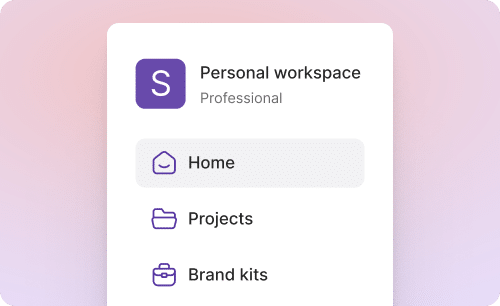
Create, customize and scale video on one platform

Pictory Web App

To create, edit, and collaborate on videos, by adapting content quickly

A secure video application that enables teams across the organization to create, update, and adapt video efficiently. 

Pictory AI Studio

To generate your own custom images and clips when stock assets fall short

A built-in creation environment that enables teams to describe what they need and create visuals on demand—directly within the video tool. 

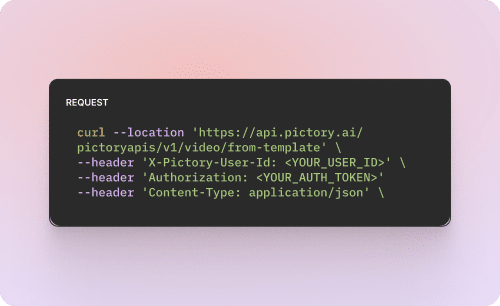
Pictory API

To automate dynamic and personalized video creation at scale

A robust API that integrates with existing systems and workflows to generate video programmatically across audiences, regions, and use cases.

How to Use URL to Video Maker for Enterprise in 4 Easy Steps


Step 1

Add Your URL

Paste a blog post, article, or webpage link into the platform to begin creating your video.

Idea to Video Script Generator AI

Step 2

Generate Video from URL Content

Pictory AI extracts content, builds scenes, and applies visuals and narration automatically.

Step 3

Customize with Templates and Avatars

Choose templates and add presenters to improve clarity and engagement.

Storyboard editor - idea to video
ai video trends

Step 4

Edit and Export Your Video

Refine scenes and export videos ready for distribution across your channels.

URL to Video Maker for Enterprise for Global Teams

URL to video maker for enterprise supports multilingual voiceovers and captions, making it easier to adapt content for global audiences. Teams can localize videos without recreating content.

AI Video Editor - Localization and Global Reach
Supported Platforms and Channels

Supported Platforms and Channels

Videos created with Pictory AI are optimized for websites, marketing platforms, internal systems, and social media. Content can be formatted for different aspect ratios depending on where it will be used.

Reasons to Use URL to Video Maker for Enterprise

  • Fastest way to turn ideas into videos
  • AI-generated scripts and visuals
  • Custom branding and layouts
  • Ideal for marketing, training, and education
  • Compatible with popular platforms
  • No technical skills required

Use Cases for URL to Video Maker for Enterprise

Marketing Campaigns:

Generate explainer videos or product teasers from your campaign concepts instantly.

Educational Tutorials

Turn lesson ideas into complete teaching videos with narration and visuals.

Corporate Training

Convert internal communication topics into polished instructional videos. 

Social Media Content

Create short-form videos tailored for brand awareness and audience engagement.

Get Started with URL to Video Maker for Enterprise

Start creating videos from your existing content with Pictory AI’s URL to video maker for enterprise and scale your video strategy faster.

In partnership with

URL to Video Maker for Enterprise FAQs


What is URL to video maker for enterprise?

URL to video maker for enterprise is AI technology that converts webpage content into structured videos automatically.

How does URL to video maker for enterprise work?

You paste a URL, and the AI extracts content, builds scenes, adds visuals, narration, and captions.

Can teams use this for marketing content?

Yes, blogs and landing pages can be turned into engaging videos quickly.

Do videos support AI avatars?

Yes, avatars can present content clearly without requiring on camera talent.

Can videos be updated easily?

Yes, update the source URL or content and regenerate the video instantly.

Does it support global teams?

Yes, multilingual features allow videos to be adapted for different regions.

Book your 30-minute Pictory Enterprise demo

HOW IT WORKS

  • Understand how Pictory works for your teams
  • Get custom pricing for enterprise plans
  • Discover success stories from our customers

Trusted by over 20,000 companies of all sizes

Limited Offer: 40% Off Pro Annual + 2X AI Credits

Limited Offer: 40% Off Pro Annual
+ 2X AI Credits