
Refine the picture and on-screen content in the editor. This guide covers visuals, AI Studio, captions and titles, styles, elements, and Scene layers.
How do you replace and crop visuals?
Step 1: Select the visual
Select the scene and the visual you want to change.
Step 2: Open Visuals
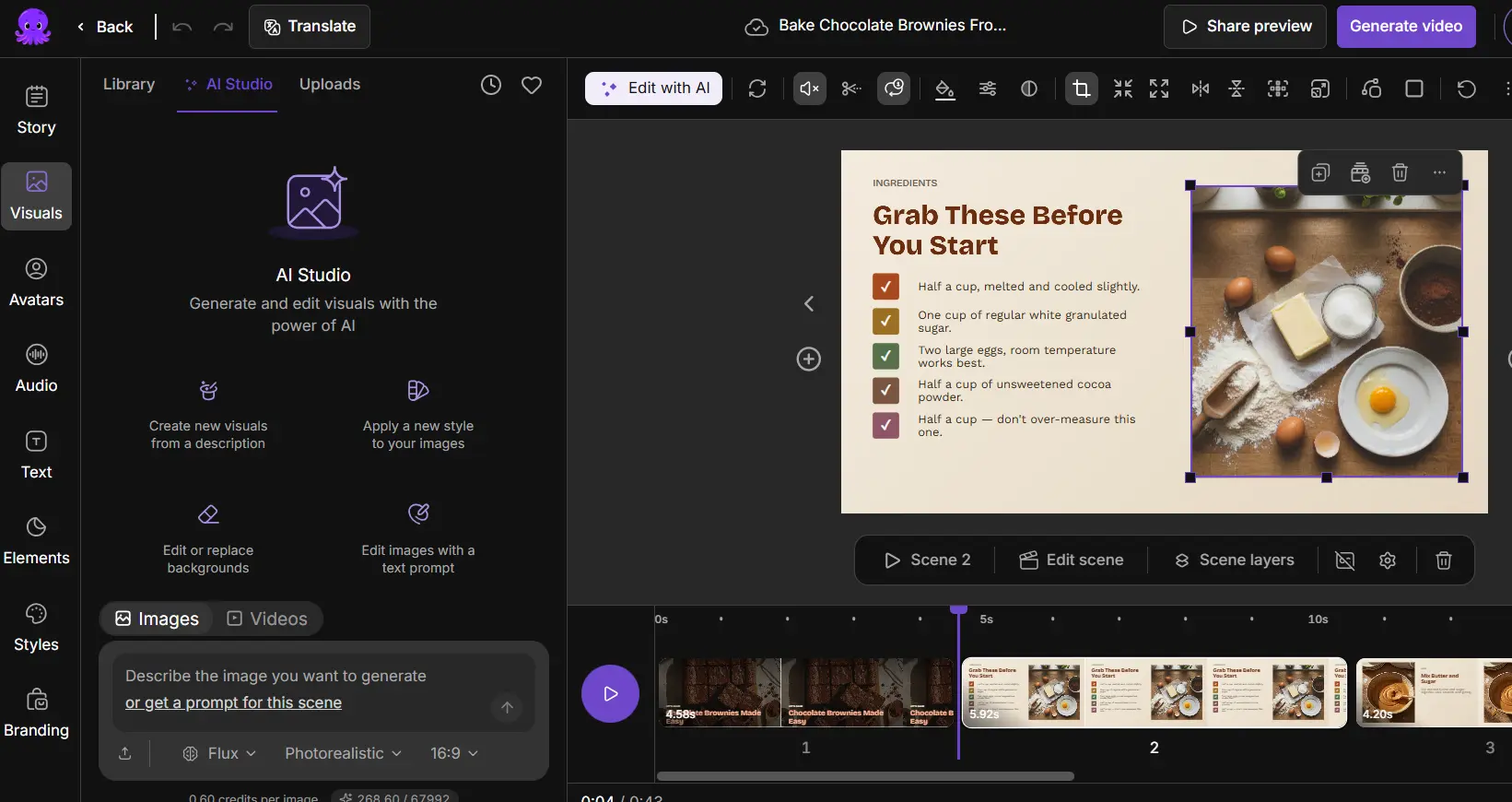
Open Visuals to search stock media, browse uploads, or open AI Studio.
Step 3: Replace it
Preview a candidate and use its replacement control.
Step 4: Adjust the framing
To adjust framing, open the crop control, move or resize the crop, and select Done. Use Cancel to discard the draft crop.
Step 5: Play the scene
Play the full scene to check moving subjects, clip endings, and source audio.
A scene can have a background and smaller inset visuals. If the wrong visual changes, select the intended layer before replacing it. Cropping doesn’t change the project aspect ratio.
How do you generate media in AI Studio?
Open Visuals and AI Studio. Choose image or video mode and describe the subject, setting, composition, and appearance. Select the offered aspect ratio, style, model, and clip-duration options, and add a reference image when supported.
For an image edit, explain what to change and what to preserve. Preview the result and apply it to the intended visual, and save useful media to uploads when offered. Check generated lettering, faces, chart details, and product appearance. Use Edit scene to redesign a whole composition rather than generate one media asset.
What is the difference between narration, captions, and titles?
Edit spoken words in Story and apply AI voiceover changes afterward. Captions represent narration. Decorative titles and calls to action are separate text elements, so editing a heading doesn’t rewrite spoken words.
Changing transcript text in a recording doesn’t change recorded speech. Select or add decorative text from Text, then adjust its wording, font, size, color, alignment, and position. Check that captions and headings stay readable throughout the scene.
How do you apply text styles and elements?
Select text, open Styles, and choose a style. If needed, apply the style to all captions. A layout or brand change can affect typography and layout. Use Elements to add shapes or other available elements, and position and resize them without covering faces, captions, or chart labels. Play animated elements to check their behavior.
How do you use Scene layers?
Step 1: Open Scene layers
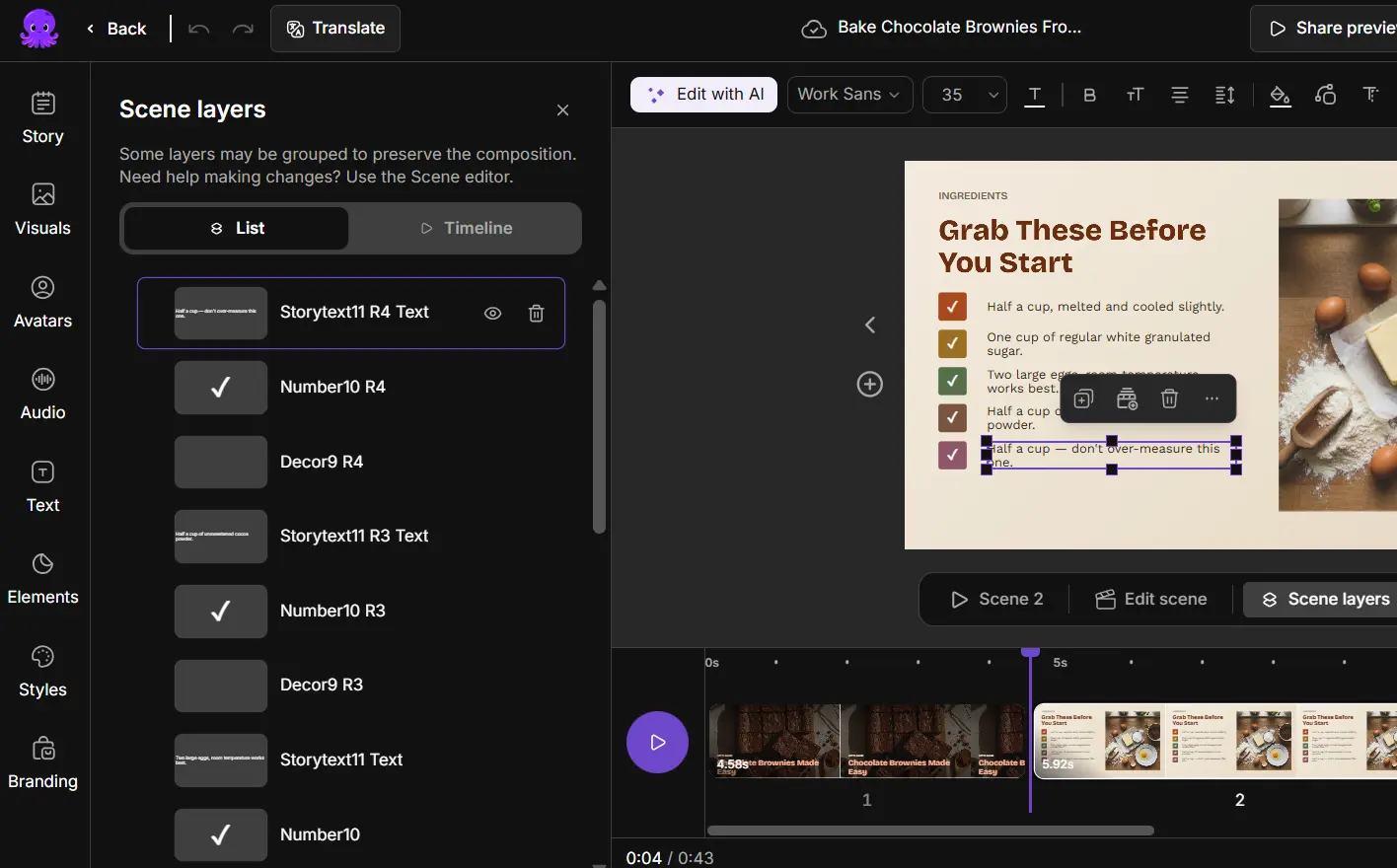
Open Scene layers to understand the layers and select a specific scene.
Step 2: Select the layer
Select the intended layer. Expand a group when the element is nested.
Step 3: Hide, show, or delete
Use the eye control to hide or show it, or the delete control to remove it.
Step 4: Change the stacking order
Drag a layer within its group to change stacking order.
Step 5: Scrub through the scene
Scrub through the scene to check when the element appears.
If content looks missing, check visibility, overlap, and timed appearance before you add a duplicate. If timing controls are available, set when the element appears and disappears, and play both points to check the result.
Try it on your next video
Bring a brief or a source and review the story before it renders.
Related Academy guides
Academy guide.
Academy guide.
Academy guide.
Academy guide.
The hub for everything in Pictory 3.
Frequently asked questions
How do I replace a visual in a scene?
Select the scene and the visual you want to change, open Visuals, and search stock media, browse uploads, or open AI Studio. Preview a candidate and use its replacement control. Then play the full scene to check moving subjects, clip endings, and source audio.
Does cropping a visual change my video’s aspect ratio?
No. Cropping adjusts the framing of one visual and doesn’t change the project aspect ratio. Open the crop control, move or resize the crop, and select Done, or select Cancel to discard the draft crop. Play the scene afterward to check the framing.
Why didn’t changing a heading change what is spoken?
Captions represent narration, but decorative titles and calls to action are separate text elements. To change spoken words, edit them in Story and then apply AI voiceover changes. Editing a heading changes only the on-screen text, and changing transcript text in a recording doesn’t change the recorded speech either.
Why can’t I see an element I added?
Open Scene layers and check whether the element is hidden, covered by another layer, duplicated, or set to appear later in the scene. Use the eye control to show it, and scrub through the scene to check when it appears, before adding a duplicate.
What should I check in AI-generated media?
Preview the result before you apply it, and check generated lettering, faces, chart details, and product appearance. Apply it to the intended visual, and save useful media to uploads when offered. Use Edit scene when you want to redesign a whole composition.


