You exported a clean vertical video, posted it, and TikTok’s interface swallowed your text. It happens because TikTok captions live on top of your footage, not beside it. Get the placement right once and it stops happening. Pictory does that part before you upload, generating and styling the subtitles so you can park them clear of the interface. Here are the sizes, the danger zones, and the workflow.
TL;DR
TikTok captions mean two things: the description under your post, and the subtitles burned into your video. For subtitles, work on a 1080 by 1920 frame and keep text in the middle band, clear of the bottom description block and the right-hand button column. For descriptions, front-load the hook, because only the first line or two shows before the cut.
TikTok Uses “Caption” for Two Different Things
The first is the description under your post, with your hashtags. The second is the subtitles on screen, the words that appear as you speak. Both get called captions, and they have nothing to do with each other.
Most people arriving with a caption problem mean the second one, because that’s the one the interface covers. Sections two, three, five, and six cover subtitles. Section four covers the description.
What Size Should TikTok Subtitles Be?
Build on a 1080 by 1920 canvas at 9:16, and size subtitles so two to three lines fill the middle of the frame comfortably. If you can’t read it on your own phone at arm’s length, it’s too small. Nobody is going to squint at your video.
Two lines is the working maximum. Three is survivable for a dense sentence. Four turns your video into a slide, and the viewer’s eye stops tracking the footage entirely.
Contrast matters more than size. White text with a dark stroke or a solid background block stays readable over any footage, including the bright, busy clips where plain white disappears. Pick one treatment and keep it across the series.
Where Do TikTok’s UI Elements Cover Your Text?
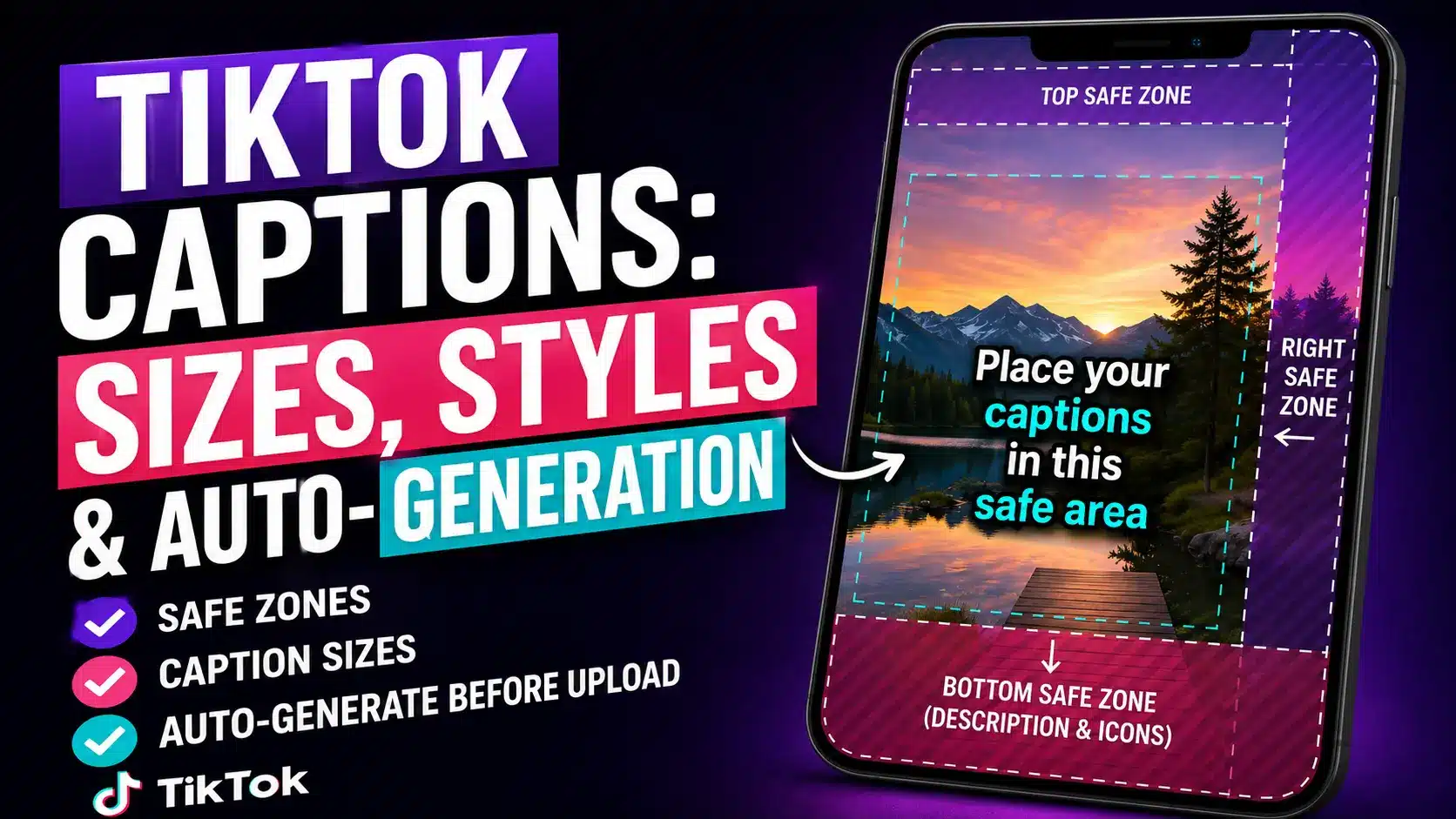
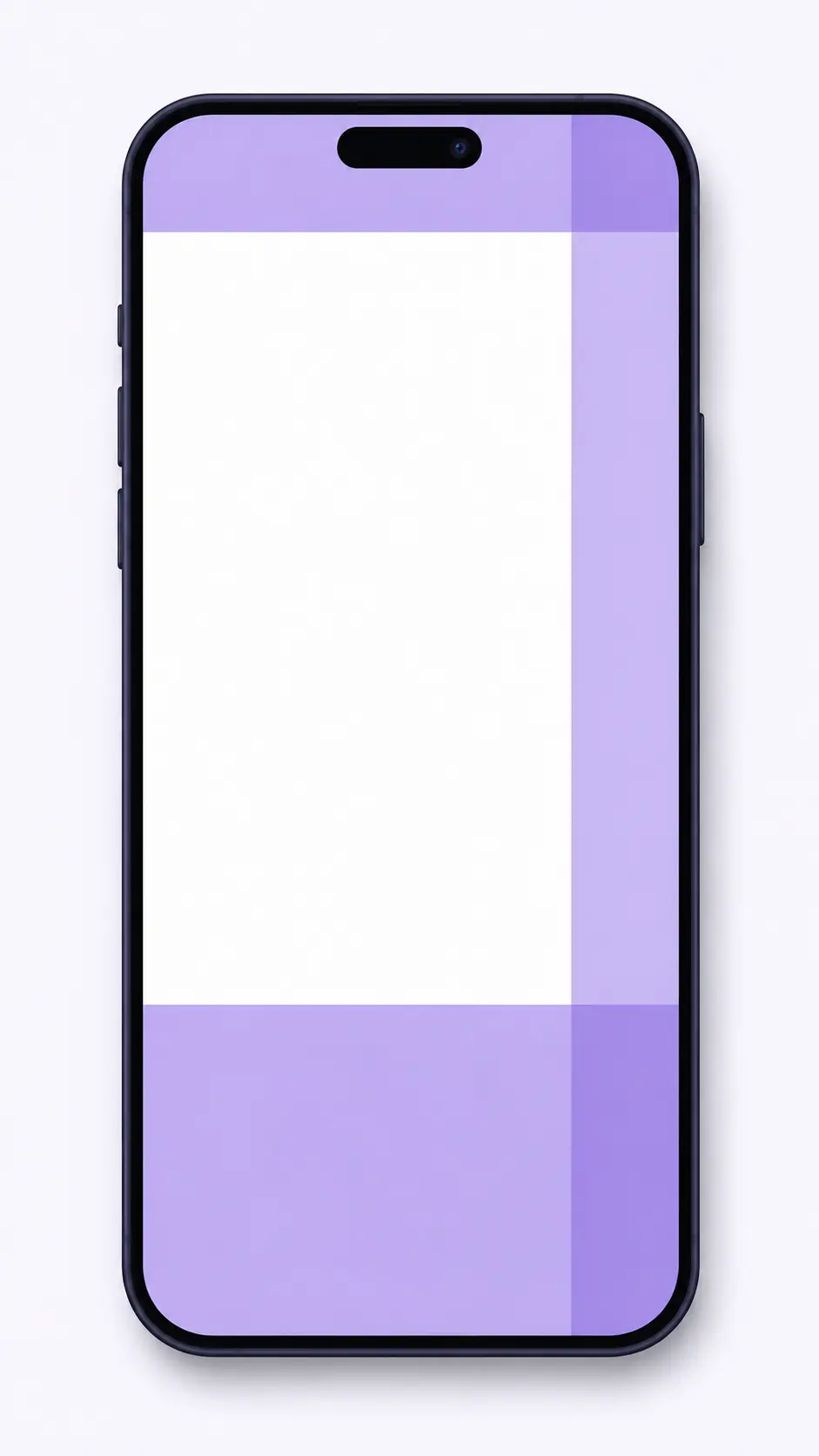
Four places: a strip across the top, a deep block along the bottom holding the description and audio ticker, the right-hand column of like, comment, and share buttons, and a thin margin down the left where phones with different aspect ratios clip the edge. Keep your subtitles out of all four.
Here’s the part most guides get wrong. There is no fixed pixel table. TikTok’s own ad documentation states that the safe zone depends on the ad dimension format and the caption length, and that a longer caption shrinks the safe zone further. Any article handing you exact numbers is describing one moment in one app version.
So treat these as working approximations on a 1080 by 1920 frame, not gospel:
| Edge | Keep clear | What lives there |
|---|---|---|
| Top | ~150 px | Status bar, feed tabs, search |
| Bottom | ~400 px or more | Username, description, audio ticker, progress bar |
| Right | ~130 px | Profile, like, comment, bookmark, share |
| Left | ~60 px | Edge clipping across phone sizes |
The rule that survives every app update is simpler than any table: put subtitles in the middle band of the frame, slightly above center, and preview on a real phone before you publish. If you run ads, download TikTok’s own safe zone template files from Ads Manager and build them into your editing template.
One more trap. Auto-captions generated inside TikTok land near the bottom by default, right where the description sits. That’s the single most common reason text gets buried.
How Long Should a TikTok Caption Be?
The description field takes far more than you’ll ever use, so the limit isn’t the constraint. Only the first line or two shows before the “more” cut, which means everything that has to land must land in roughly the first 100 characters.
Worth knowing if you schedule posts: the in-app limit and the API limit aren’t the same. Schedulers publishing through TikTok’s Content Posting API cap out lower than the app does, so a long description written in a planning tool can get rejected. Check your scheduler’s ceiling before you write to the app’s.
Three habits cover most of it. Put the hook first. Keep hashtags to a focused handful at the end rather than a wall. And write the description for someone who has already watched the video, not as a summary of it.
Caption Styles That Hold Attention
Three treatments cover almost every video, and the right one depends on your pacing rather than your taste.
Word-by-word highlight
Each word lights up as it’s spoken. Strong for quick, punchy delivery. Tiring on anything longer than about 30 seconds.
Static blocks
A full phrase appears and holds. Easier to read, better for anything instructional, and far less distracting over a demo.
Karaoke timing
A line builds as it’s spoken, then clears. Sits between the other two, and holds up well on longer clips.
Pictory Academy walks through the controls in how to use subtitle styling. Whichever you pick, legibility beats style every time. And consistency across a series is worth more than any single choice, because a recognizable caption look is one of the few branding signals that survives a muted autoplay.
How Do You Auto-Generate TikTok Subtitles?
Generate them before you upload, not inside the app. That way you control the wording, the line breaks, the style, and the placement, and you can reuse the same look across every clip instead of accepting whatever TikTok puts on screen.
Upload your clip and set 9:16
Set the aspect ratio before anything else. Changing it later moves every element you’ve already positioned.
Turn subtitles on and cap the line count
Set max lines to two. This one control does more for readability than any style choice you’ll make afterward.
Pick a style and position it
Choose from the style library or save your own, then drag the subtitle block into the middle band, clear of the bottom quarter and the right column.
Check the transcript, then export
Scan for names, product terms, and acronyms, which is where auto-transcription slips. Fix those, then download and upload to TikTok.
Pictory’s caption generator runs this whole flow, and the same steps work whether you’re captioning a fresh recording or a clip pulled from a longer video. If you’re cutting shorts from webinars, the video clip generator handles the trimming first. Pictory Academy covers the same four steps with screenshots in how to add subtitles and captions, and our guide to adding subtitles automatically covers the same process for other platforms.
Caption every clip in one pass
Auto-generated subtitles, your own style, positioned where TikTok won’t cover them.
Verdict: When to Caption Outside the App
If you post to TikTok regularly and to other platforms as well, generate subtitles before upload. You get one caption style across every clip, you control placement, and the same export works on Reels and Shorts with a placement tweak. That’s the daily reality for most social media managers running more than one channel.
TikTok’s in-app auto-captions are fine in two cases: a one-off post, or a spontaneous clip where speed beats polish. They’re free, they’re fast, and for a single video nobody will notice the default styling. What they can’t do is stay consistent across a series or sit where you want them.
The practical move is to set your caption style once, save it, and stop thinking about it. Then the only per-video decision left is checking the transcript for names it got wrong.
One caption style, every video
Save your look to a brand kit and apply it across the whole series.
FAQ: TikTok Captions
What size should TikTok captions be?
Build on a 1080 by 1920 frame and size subtitles so they stay readable on a phone at arm’s length, usually two lines maximum. Keep them in the center band of the frame, clear of the bottom description block and the right-hand button column.
How many characters can a TikTok caption have?
TikTok has raised the description limit more than once, and schedulers posting through the API often cap lower than the app. Check the current number before planning around it. What matters more is that only the first line or two shows before the “more” cut.
Why does TikTok cover my captions?
The app draws its interface on top of your video. The bottom holds the description and audio ticker, the right side holds the like and share buttons. Text placed in those areas gets covered. Move subtitles into the middle band of the frame.
Does TikTok auto-generate captions?
Yes, TikTok can add auto-captions in the app, but they use default styling and default placement near the bottom. Generating subtitles before you upload gives you control over the style, line breaks, and position, and keeps one look across a whole series.
Do captions help TikTok videos perform better?
Captions make videos watchable with the sound off, which is how a large share of people scroll. They also make your content accessible to deaf and hard-of-hearing viewers. Treat them as a default part of every export rather than an optimization to test.
Keep reading
Trimming, pacing and vertical framing before the captions go on.
The full build, from source footage to a finished vertical clip.
What the hook and the first three seconds have to do.
![[Article] - AI UGC: User-Generated-Style Ads Without Creators](https://pictory.ai/wp-content/uploads/2026/08/blog-ai-ugc-300x169.webp)